> ## Documentation Index
> Fetch the complete documentation index at: https://docs.runcomfy.com/llms.txt
> Use this file to discover all available pages before exploring further.
# Async Queue Endpoints
These endpoints power the **asynchronous** (request-id based) Model API flow. You submit a job, get back a `request_id` immediately, then poll status and fetch results when the run completes.
You can use the same endpoints for two sources:
* **Models catalog**: run any prebuilt model from [Models](https://www.runcomfy.com/models) by calling its `model_id`.
* **Trainer LoRA inference (no deployment)**: run inference for a LoRA trained (or imported) in **[RunComfy Trainer](https://www.runcomfy.com/trainer/ai-toolkit/app)** by calling the **same Model API endpoints** with the `model_id` of the LoRA’s **base model** (copy it from the base model’s model page), and pass the LoRA as an **input parameter** (see [LoRA Inputs (Trainer)](#lora-inputs-trainer)).
## Endpoints
**Base URL**: `https://model-api.runcomfy.net`
| Endpoint | Method | Purpose |
| ---------------------------------- | ------ | ------------------------------ |
| `/v1/models/{model_id}` | `POST` | Submit an asynchronous request |
| `/v1/requests/{request_id}/status` | `GET` | Check request status |
| `/v1/requests/{request_id}/result` | `GET` | Retrieve request result |
| `/v1/requests/{request_id}/cancel` | `POST` | Cancel a queued request |
## Common Path Parameters
`model_id` string (required). The identifier of the model/pipeline you want to run (e.g., `blackforestlabs/flux-1-kontext/pro/edit`).
* For **Models catalog** usage, pick a model from [Models](https://www.runcomfy.com/models). Each model page shows its `model_id`.
* For **Trainer** usage, in **Trainer > [Run LoRA](https://www.runcomfy.com/trainer/inference)** select your LoRA’s **base model**, then open that base model page and copy its `model_id` (this `model_id` represents the inference pipeline you’ll run via the Model API).
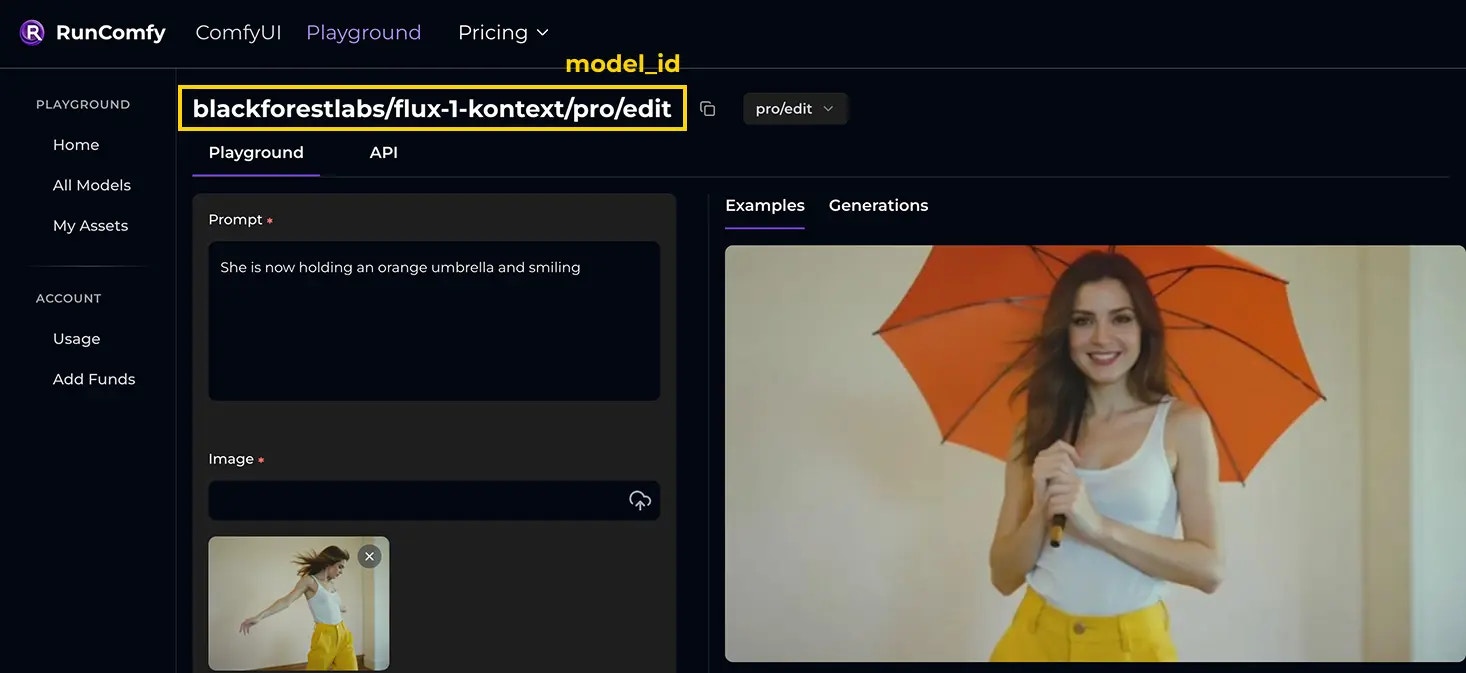 `request_id` string (required for non‑submit endpoints). Returned by `POST /v1/models/{model_id}`; use it to check status, fetch result, or cancel.
***
## Submit a Request
Submit an asynchronous request to a model. Returns a `request_id` and convenience URLs to poll and fetch results.
```
POST /v1/models/{model_id}
```
### **Request Example**
Example using the [blackforestlabs/flux-1-kontext/pro/edit](https://www.runcomfy.com/models/blackforestlabs/flux-1-kontext-pro/image-to-image) model:
```bash theme={null}
curl --request POST \
--url https://model-api.runcomfy.net/v1/models/blackforestlabs/flux-1-kontext/pro/edit \
--header "Content-Type: application/json" \
--header "Authorization: Bearer " \
--data '{
"prompt": "She is now holding an orange umbrella and smiling",
"image_url": "https://playgrounds-storage-public.runcomfy.net/tools/7063/media-files/usecase1-1-input.webp",
"seed": 81030369,
"aspect_ratio": "16:9"
}'
```
Request body keys (e.g., `prompt`, `image_url`, `seed`, `aspect_ratio`) map 1:1 to this model’s Input schema. See the model’s API page for required fields, types, enums, and defaults. For reference, see the Input schema on the [blackforestlabs/flux-1-kontext/pro/edit API page](https://www.runcomfy.com/models/blackforestlabs/flux-1-kontext-pro/image-to-image/api#input-schema).
`request_id` string (required for non‑submit endpoints). Returned by `POST /v1/models/{model_id}`; use it to check status, fetch result, or cancel.
***
## Submit a Request
Submit an asynchronous request to a model. Returns a `request_id` and convenience URLs to poll and fetch results.
```
POST /v1/models/{model_id}
```
### **Request Example**
Example using the [blackforestlabs/flux-1-kontext/pro/edit](https://www.runcomfy.com/models/blackforestlabs/flux-1-kontext-pro/image-to-image) model:
```bash theme={null}
curl --request POST \
--url https://model-api.runcomfy.net/v1/models/blackforestlabs/flux-1-kontext/pro/edit \
--header "Content-Type: application/json" \
--header "Authorization: Bearer " \
--data '{
"prompt": "She is now holding an orange umbrella and smiling",
"image_url": "https://playgrounds-storage-public.runcomfy.net/tools/7063/media-files/usecase1-1-input.webp",
"seed": 81030369,
"aspect_ratio": "16:9"
}'
```
Request body keys (e.g., `prompt`, `image_url`, `seed`, `aspect_ratio`) map 1:1 to this model’s Input schema. See the model’s API page for required fields, types, enums, and defaults. For reference, see the Input schema on the [blackforestlabs/flux-1-kontext/pro/edit API page](https://www.runcomfy.com/models/blackforestlabs/flux-1-kontext-pro/image-to-image/api#input-schema).
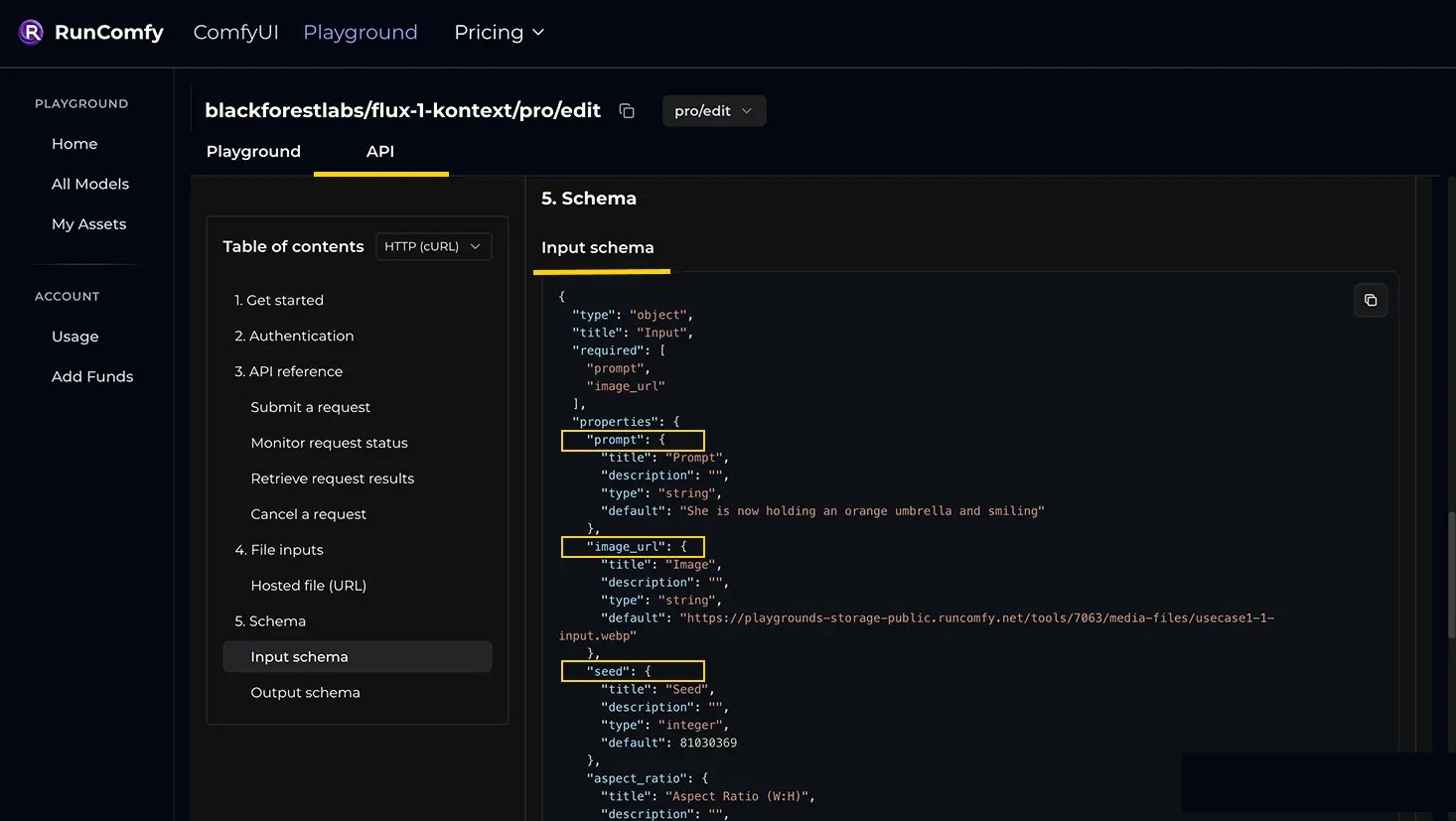 ### **Response Example**
```json theme={null}
{
"request_id": "{request_id}",
"status_url": "https://model-api.runcomfy.net/v1/requests/{request_id}/status",
"result_url": "https://model-api.runcomfy.net/v1/requests/{request_id}/result",
"cancel_url": "https://model-api.runcomfy.net/v1/requests/{request_id}/cancel"
}
```
Successful requests return 200 OK with a JSON object providing request tracking details.
* `request_id` (string): Unique identifier for the request.
* `status_url` (string): URL to poll for request progress.
* `result_url` (string): URL to fetch outputs once the request completes.
* `cancel_url` (string): URL to cancel the request if still queued.
***
## Monitor Request Status
Poll the current state for a `request_id`. Typical states are: `in_queue` > `in_progress` > `completed` (or `cancelled`).
```
GET /v1/requests/{request_id}/status
```
### Request Example
```bash theme={null}
curl --request GET \
--url https://model-api.runcomfy.net/v1/requests/{request_id}/status \
--header "Authorization: Bearer "
```
### Response Example
```json theme={null}
{
"request_id": "{request_id}",
"status": "in_queue",
"queue_position": 3,
"status_url": "https://model-api.runcomfy.net/v1/requests/{request_id}/status",
"result_url": "https://model-api.runcomfy.net/v1/requests/{request_id}/result"
}
```
Successful requests return a 200 OK status with a JSON object describing the request’s state.
* `status` (string): States while polling: `in_queue`, `in_progress`, `completed`, `cancelled`.
* `status_url` (string): URL to poll for request progress.
* `result_url` (string): URL to fetch outputs once the request completes.
* For `in_queue`, `queue_position` (integer): Your position in the queue.
***
## Retrieve Request Results
When `status` is `completed`, fetch the final outputs. The shape of result (single URI vs. object/array) is defined by the model’s Output schema on its API page.
```
GET /v1/requests/{request_id}/result
```
### Request Example
```bash theme={null}
curl --request GET \
--url https://model-api.runcomfy.net/v1/requests/{request_id}/result \
--header "Authorization: Bearer "
```
### Response Example
```json theme={null}
{
"request_id": "{request_id}",
"status": "succeeded",
"output": {
"image": "https://playgrounds-storage-public.runcomfy.net/a.png",
"videos": [
"https://playgrounds-storage-public.runcomfy.net/a.mp4",
"https://playgrounds-storage-public.runcomfy.net/b.mp4",
"https://playgrounds-storage-public.runcomfy.net/c.mp4"
]
}
}
```
Successful requests return **200 OK** with a JSON object containing the request’s final details.
* `status` (string): One of `succeeded`, `failed`, `in_queue`, `in_progress`, or `cancelled`.
* `output` (varies by model): the response body defined by the model’s Output schema (often URLs to generated assets).
* `created_at` (string): When the request was created.
* `finished_at` (string): When the request completed.
***
## Cancel a Request
Cancel a request that is still queued. Already completed or terminated requests will be no‑ops.
```
POST /v1/requests/{request_id}/cancel
```
### Request Example
```bash theme={null}
curl --request POST \
--url https://model-api.runcomfy.net/v1/requests/{request_id}/cancel \
--header "Authorization: Bearer "
```
### Response Example
```json theme={null}
{
"request_id": "{request_id}",
"status": "completed",
"outcome": "cancelled"
}
```
Successful requests return a 202 Accepted status with a JSON object containing the cancellation outcome.
* `outcome` (string): `cancelled` if the cancellation is accepted; `not_cancellable` if the request is already in progress or completed.
***
## Image/Video/Audio Inputs
Use **a publicly accessible HTTPS URL** that returns the file with an unauthenticated GET request (no cookies or auth headers). Prefer stable or pre‑signed URLs for private assets.
```json theme={null}
{
"image_url": "https://playgrounds-storage-public.runcomfy.net/tools/7063/media-files/usecase1-1-input.webp"
}
```
***
## LoRA Inputs (Trainer)
This section applies to **LoRA inference**. If you’re not deploying your LoRA as a dedicated endpoint, you can run it directly via the **Model API**.
In this flow, the Model API works the same way as for the Models catalog (same base URL and endpoints). The key differences are:
* Your `model_id` represents the inference **pipeline** you’ll run via the Model API (in **Trainer > Run LoRA**, select your LoRA’s **base model**, then open that base model page and copy its `model_id`).
* The LoRA is provided via **input parameters** in the request body (your payload must match that pipeline’s Input schema).
LoRA `path` can be set in two ways in *Model API*:
* **LoRA name** from your [LoRA Assets](https://www.runcomfy.com/trainer/lora-assets), e.g. `"path": "my_first_lora_3000.safetensors"`
* **Public URL**, e.g. `"path": "https://example.com/my_first_lora_3000.safetensors"`
Example payload fragment:
```json theme={null}
{
"lora": {
"path": "my_first_lora_3000.safetensors"
}
}
```
If you need a **dedicated endpoint** (stable `deployment_id`), or want to **choose hardware / autoscale**, deploy it and use **[Serverless API (LoRA)](/serverless-lora/introduction)** instead of the Model API.
### **Response Example**
```json theme={null}
{
"request_id": "{request_id}",
"status_url": "https://model-api.runcomfy.net/v1/requests/{request_id}/status",
"result_url": "https://model-api.runcomfy.net/v1/requests/{request_id}/result",
"cancel_url": "https://model-api.runcomfy.net/v1/requests/{request_id}/cancel"
}
```
Successful requests return 200 OK with a JSON object providing request tracking details.
* `request_id` (string): Unique identifier for the request.
* `status_url` (string): URL to poll for request progress.
* `result_url` (string): URL to fetch outputs once the request completes.
* `cancel_url` (string): URL to cancel the request if still queued.
***
## Monitor Request Status
Poll the current state for a `request_id`. Typical states are: `in_queue` > `in_progress` > `completed` (or `cancelled`).
```
GET /v1/requests/{request_id}/status
```
### Request Example
```bash theme={null}
curl --request GET \
--url https://model-api.runcomfy.net/v1/requests/{request_id}/status \
--header "Authorization: Bearer "
```
### Response Example
```json theme={null}
{
"request_id": "{request_id}",
"status": "in_queue",
"queue_position": 3,
"status_url": "https://model-api.runcomfy.net/v1/requests/{request_id}/status",
"result_url": "https://model-api.runcomfy.net/v1/requests/{request_id}/result"
}
```
Successful requests return a 200 OK status with a JSON object describing the request’s state.
* `status` (string): States while polling: `in_queue`, `in_progress`, `completed`, `cancelled`.
* `status_url` (string): URL to poll for request progress.
* `result_url` (string): URL to fetch outputs once the request completes.
* For `in_queue`, `queue_position` (integer): Your position in the queue.
***
## Retrieve Request Results
When `status` is `completed`, fetch the final outputs. The shape of result (single URI vs. object/array) is defined by the model’s Output schema on its API page.
```
GET /v1/requests/{request_id}/result
```
### Request Example
```bash theme={null}
curl --request GET \
--url https://model-api.runcomfy.net/v1/requests/{request_id}/result \
--header "Authorization: Bearer "
```
### Response Example
```json theme={null}
{
"request_id": "{request_id}",
"status": "succeeded",
"output": {
"image": "https://playgrounds-storage-public.runcomfy.net/a.png",
"videos": [
"https://playgrounds-storage-public.runcomfy.net/a.mp4",
"https://playgrounds-storage-public.runcomfy.net/b.mp4",
"https://playgrounds-storage-public.runcomfy.net/c.mp4"
]
}
}
```
Successful requests return **200 OK** with a JSON object containing the request’s final details.
* `status` (string): One of `succeeded`, `failed`, `in_queue`, `in_progress`, or `cancelled`.
* `output` (varies by model): the response body defined by the model’s Output schema (often URLs to generated assets).
* `created_at` (string): When the request was created.
* `finished_at` (string): When the request completed.
***
## Cancel a Request
Cancel a request that is still queued. Already completed or terminated requests will be no‑ops.
```
POST /v1/requests/{request_id}/cancel
```
### Request Example
```bash theme={null}
curl --request POST \
--url https://model-api.runcomfy.net/v1/requests/{request_id}/cancel \
--header "Authorization: Bearer "
```
### Response Example
```json theme={null}
{
"request_id": "{request_id}",
"status": "completed",
"outcome": "cancelled"
}
```
Successful requests return a 202 Accepted status with a JSON object containing the cancellation outcome.
* `outcome` (string): `cancelled` if the cancellation is accepted; `not_cancellable` if the request is already in progress or completed.
***
## Image/Video/Audio Inputs
Use **a publicly accessible HTTPS URL** that returns the file with an unauthenticated GET request (no cookies or auth headers). Prefer stable or pre‑signed URLs for private assets.
```json theme={null}
{
"image_url": "https://playgrounds-storage-public.runcomfy.net/tools/7063/media-files/usecase1-1-input.webp"
}
```
***
## LoRA Inputs (Trainer)
This section applies to **LoRA inference**. If you’re not deploying your LoRA as a dedicated endpoint, you can run it directly via the **Model API**.
In this flow, the Model API works the same way as for the Models catalog (same base URL and endpoints). The key differences are:
* Your `model_id` represents the inference **pipeline** you’ll run via the Model API (in **Trainer > Run LoRA**, select your LoRA’s **base model**, then open that base model page and copy its `model_id`).
* The LoRA is provided via **input parameters** in the request body (your payload must match that pipeline’s Input schema).
LoRA `path` can be set in two ways in *Model API*:
* **LoRA name** from your [LoRA Assets](https://www.runcomfy.com/trainer/lora-assets), e.g. `"path": "my_first_lora_3000.safetensors"`
* **Public URL**, e.g. `"path": "https://example.com/my_first_lora_3000.safetensors"`
Example payload fragment:
```json theme={null}
{
"lora": {
"path": "my_first_lora_3000.safetensors"
}
}
```
If you need a **dedicated endpoint** (stable `deployment_id`), or want to **choose hardware / autoscale**, deploy it and use **[Serverless API (LoRA)](/serverless-lora/introduction)** instead of the Model API.