> ## Documentation Index
> Fetch the complete documentation index at: https://docs.runcomfy.com/llms.txt
> Use this file to discover all available pages before exploring further.
# Quickstart
This guide shows how to **deploy your trained LoRA (trained with its base model) as a serverless endpoint** and run your first inference request.
> Want to run LoRA inference **without deploying**? Use the **Model API** instead.\
> Start here: **[Choose a LoRA inference API](/serverless-lora/api-types)**
***
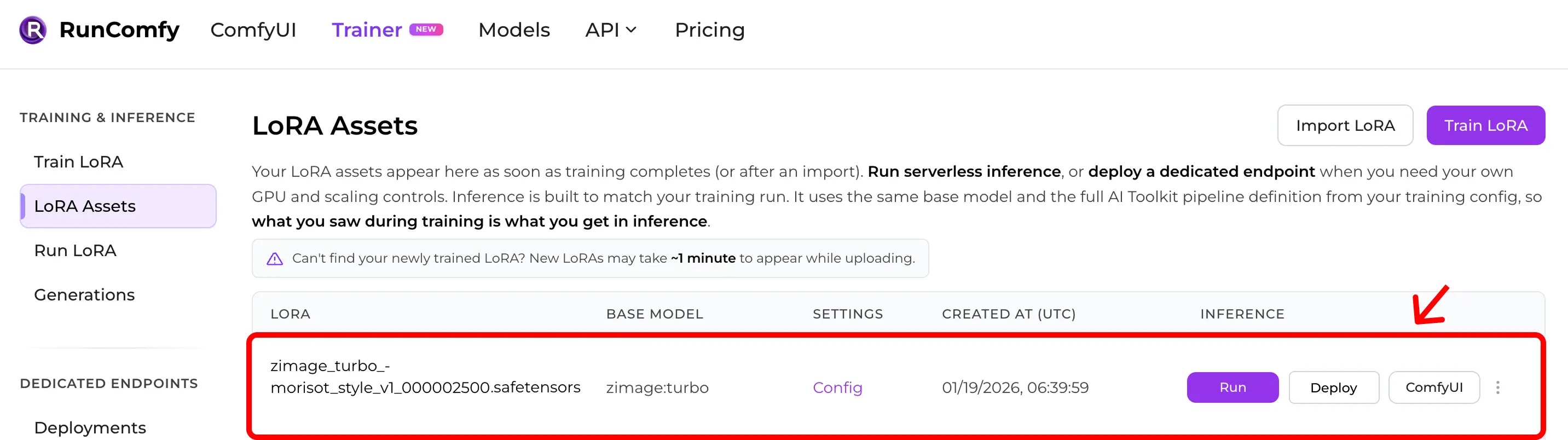
## Step 1: Make sure you have a LoRA Asset
A **LoRA Asset** comes from either:
* training in RunComfy Trainer, or
* importing a `.safetensors` LoRA (plus its training config)
You can view your assets here: [Trainer > LoRA Assets](https://www.runcomfy.com/trainer/lora-assets)
 ***
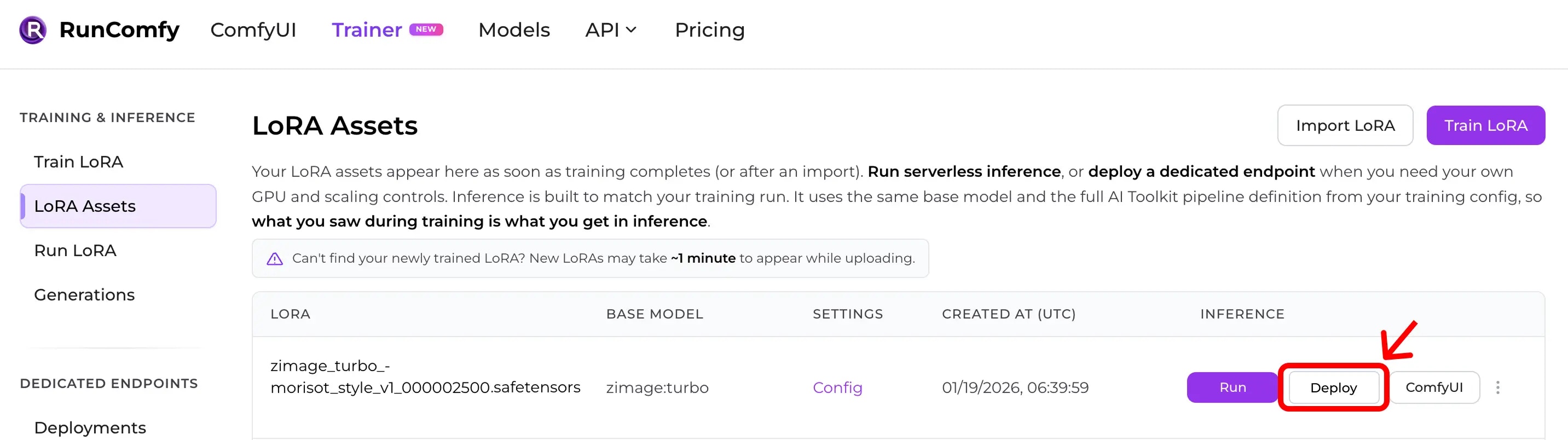
## Step 2: Create a Deployment
From the LoRA Asset page, click **Deploy** (or **Deploy Endpoint**) to create a Deployment.
***
## Step 2: Create a Deployment
From the LoRA Asset page, click **Deploy** (or **Deploy Endpoint**) to create a Deployment.
 During deployment you can choose:
* **hardware** (GPU tier)
* **autoscaling** (scale to zero, max instances, keep-warm)
When the deployment is ready, copy the `deployment_id` from the Deployment details page.
***
## Step 3: Authenticate
All API calls require a Bearer token:
`Authorization: Bearer `
Get your API token from your [Profile](https://www.runcomfy.com/profile) page.
***
## Step 4: Submit an inference request
The exact request body depends on the pipeline attached to your Deployment.\
Use the Deployment **API** tab (or its request schema in the dashboard) as the source of truth.
```bash theme={null}
curl --request POST \
--url "https://api.runcomfy.net/prod/v2/deployments/{deployment_id}/inference" \
--header "Content-Type: application/json" \
--header "Authorization: Bearer " \
--data '{
"prompt": "A cinematic portrait photo",
"...": "other fields depend on your deployment"
}'
```
**Response example:**
```json theme={null}
{
"request_id": "{request_id}",
"status_url": "https://api.runcomfy.net/prod/v2/deployments/{deployment_id}/requests/{request_id}/status",
"result_url": "https://api.runcomfy.net/prod/v2/deployments/{deployment_id}/requests/{request_id}/result",
"cancel_url": "https://api.runcomfy.net/prod/v2/deployments/{deployment_id}/requests/{request_id}/cancel"
}
```
***
## Step 5: Poll status, then fetch results
Check status:
```bash theme={null}
curl --request GET \
--url "https://api.runcomfy.net/prod/v2/deployments/{deployment_id}/requests/{request_id}/status" \
--header "Authorization: Bearer "
```
Fetch results:
```bash theme={null}
curl --request GET \
--url "https://api.runcomfy.net/prod/v2/deployments/{deployment_id}/requests/{request_id}/result" \
--header "Authorization: Bearer "
```
***
## Next steps
* Request lifecycle + file uploads: **[Async Queue Endpoints](/serverless-lora/async-queue-endpoints)**
* Deployment settings: **[Create a Deployment](/serverless-lora/create-a-deployment)**
* Troubleshooting: **[Error Codes](/serverless-lora/error-codes)**
During deployment you can choose:
* **hardware** (GPU tier)
* **autoscaling** (scale to zero, max instances, keep-warm)
When the deployment is ready, copy the `deployment_id` from the Deployment details page.
***
## Step 3: Authenticate
All API calls require a Bearer token:
`Authorization: Bearer `
Get your API token from your [Profile](https://www.runcomfy.com/profile) page.
***
## Step 4: Submit an inference request
The exact request body depends on the pipeline attached to your Deployment.\
Use the Deployment **API** tab (or its request schema in the dashboard) as the source of truth.
```bash theme={null}
curl --request POST \
--url "https://api.runcomfy.net/prod/v2/deployments/{deployment_id}/inference" \
--header "Content-Type: application/json" \
--header "Authorization: Bearer " \
--data '{
"prompt": "A cinematic portrait photo",
"...": "other fields depend on your deployment"
}'
```
**Response example:**
```json theme={null}
{
"request_id": "{request_id}",
"status_url": "https://api.runcomfy.net/prod/v2/deployments/{deployment_id}/requests/{request_id}/status",
"result_url": "https://api.runcomfy.net/prod/v2/deployments/{deployment_id}/requests/{request_id}/result",
"cancel_url": "https://api.runcomfy.net/prod/v2/deployments/{deployment_id}/requests/{request_id}/cancel"
}
```
***
## Step 5: Poll status, then fetch results
Check status:
```bash theme={null}
curl --request GET \
--url "https://api.runcomfy.net/prod/v2/deployments/{deployment_id}/requests/{request_id}/status" \
--header "Authorization: Bearer "
```
Fetch results:
```bash theme={null}
curl --request GET \
--url "https://api.runcomfy.net/prod/v2/deployments/{deployment_id}/requests/{request_id}/result" \
--header "Authorization: Bearer "
```
***
## Next steps
* Request lifecycle + file uploads: **[Async Queue Endpoints](/serverless-lora/async-queue-endpoints)**
* Deployment settings: **[Create a Deployment](/serverless-lora/create-a-deployment)**
* Troubleshooting: **[Error Codes](/serverless-lora/error-codes)**