> ## Documentation Index
> Fetch the complete documentation index at: https://docs.runcomfy.com/llms.txt
> Use this file to discover all available pages before exploring further.
# Quickstart
Deploy a ComfyUI workflow as **Serverless API (ComfyUI)** and make your first inference call.
This quickstart uses a pre-built community workflow (**RunComfy/FLUX**) so you can learn the end-to-end API flow first.
Want to deploy your own workflow instead? See **[Custom Workflows](/serverless/custom-workflows)**.
***
## What you’ll need
* A `workflow_api.json` exported from ComfyUI (**Workflow → Export (API)**)
* A deployed endpoint (`deployment_id`)
* An API token (Bearer token auth)
***
## Step 1: Prepare the workflow API file and overrides
1. Visit the [RunComfy/FLUX workflow](https://www.runcomfy.com/comfyui-workflows/comfyui-flux-a-new-art-image-generation) page and click **Run Workflow** to launch a ComfyUI session (initial startup may take a few minutes).
2. Once the UI loads, run the workflow once to confirm it works.
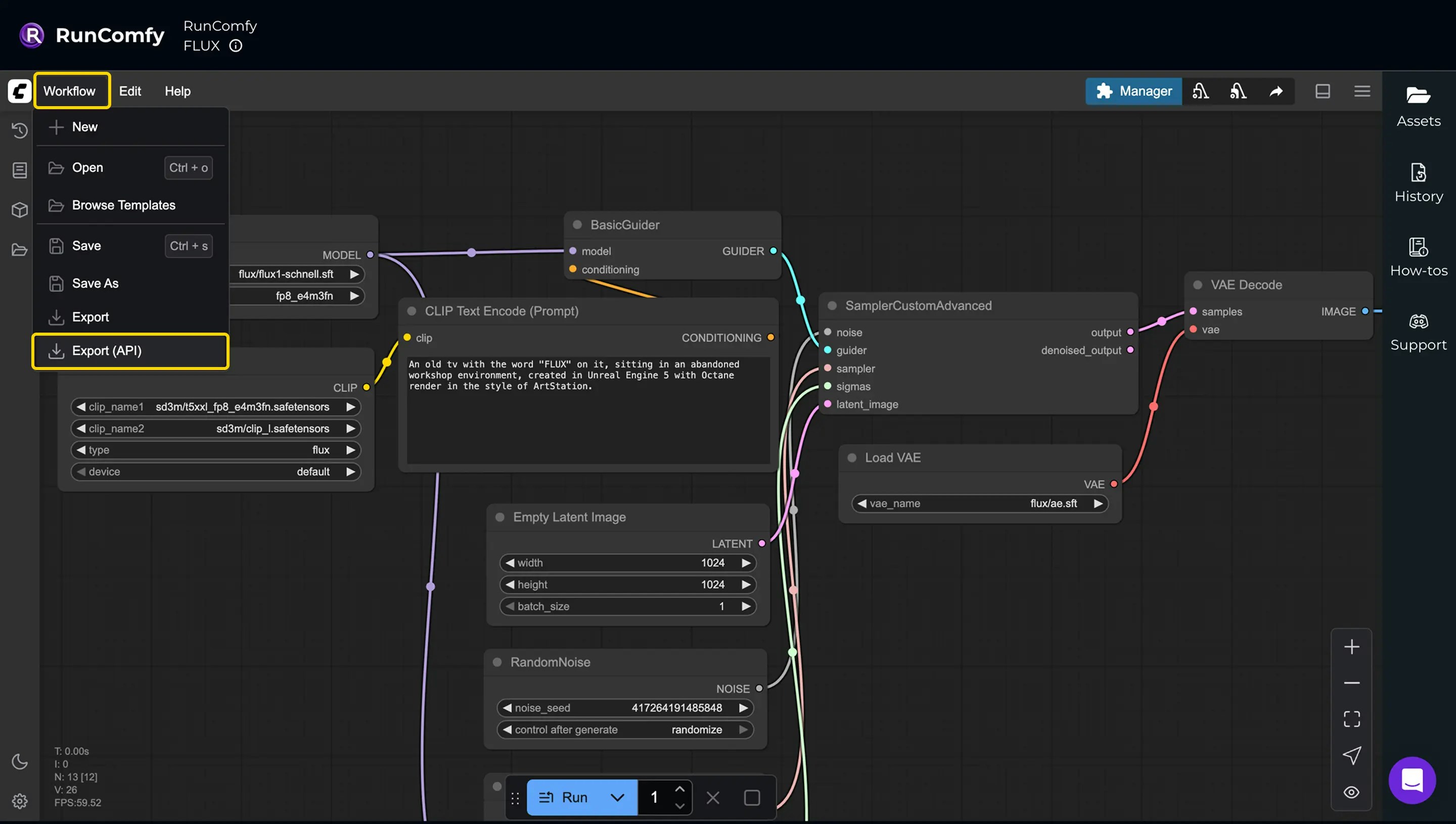
3. From the **Workflow** menu in the top-left, select **Export (API)** to download `workflow_api.json`.
The exported file will be similar to [flux\_workflow\_api.json](/static/flux_workflow_api.json).\
Learn more: **[Workflow Files](/serverless/workflow-files)**
 ### Identify which inputs you want to override
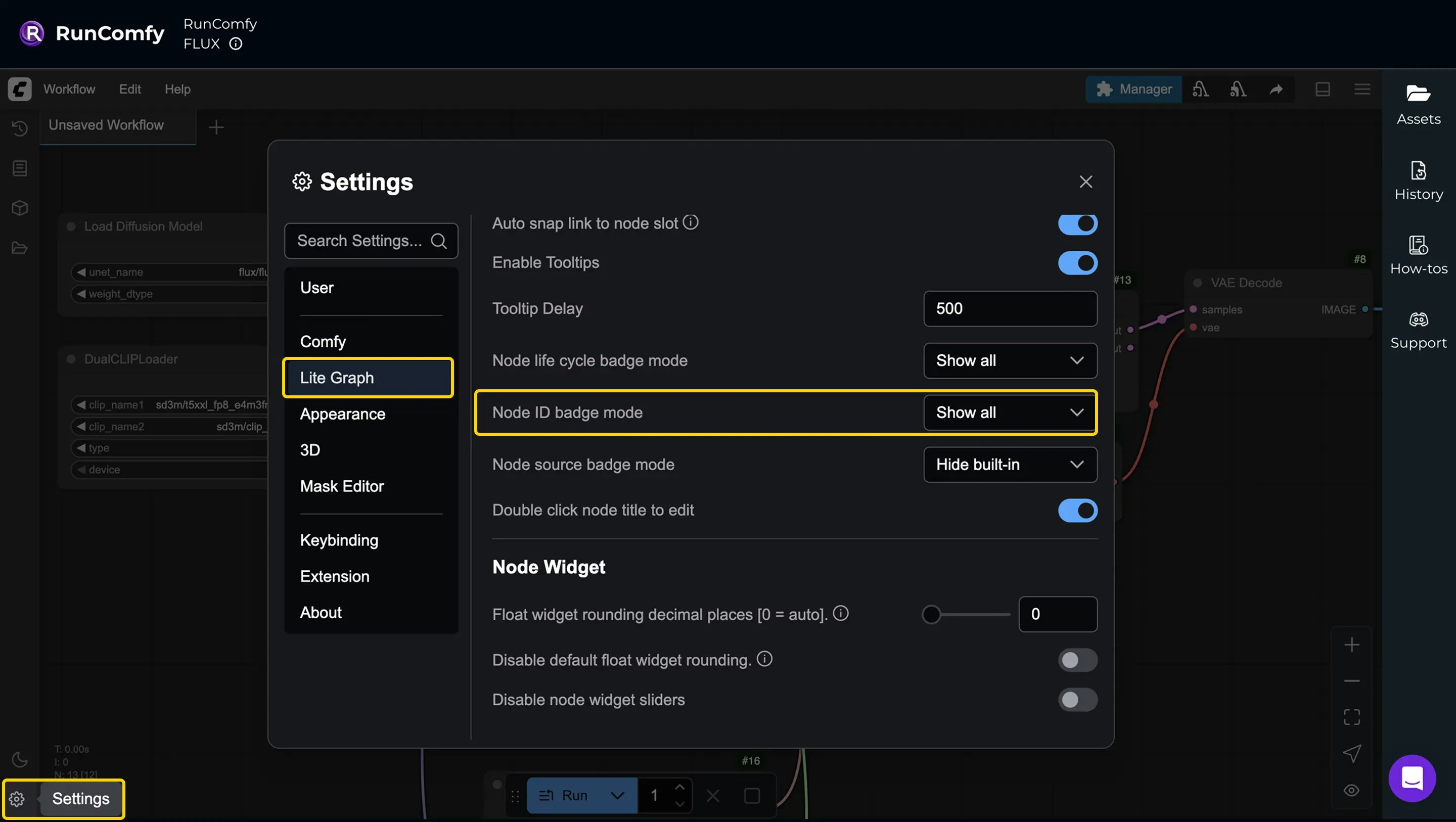
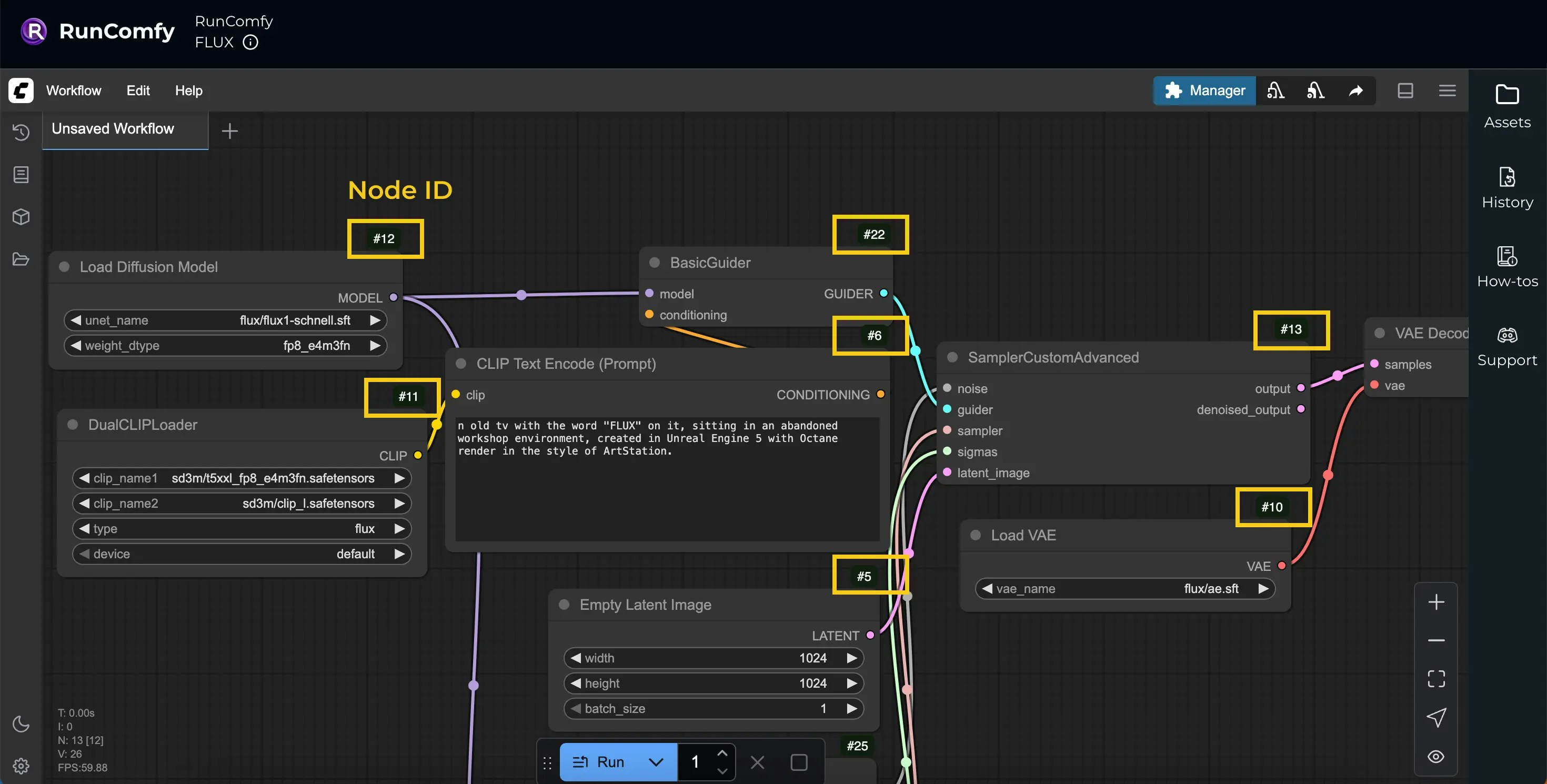
`workflow_api.json` uses **Node IDs** as keys. To make it easier to map node IDs → nodes in the UI:
* Open **Settings** (bottom-left)
* Go to **Lite Graph**
* Set **Node ID Badge Mode** to **Show All**
### Identify which inputs you want to override
`workflow_api.json` uses **Node IDs** as keys. To make it easier to map node IDs → nodes in the UI:
* Open **Settings** (bottom-left)
* Go to **Lite Graph**
* Set **Node ID Badge Mode** to **Show All**
 ### Build an overrides object
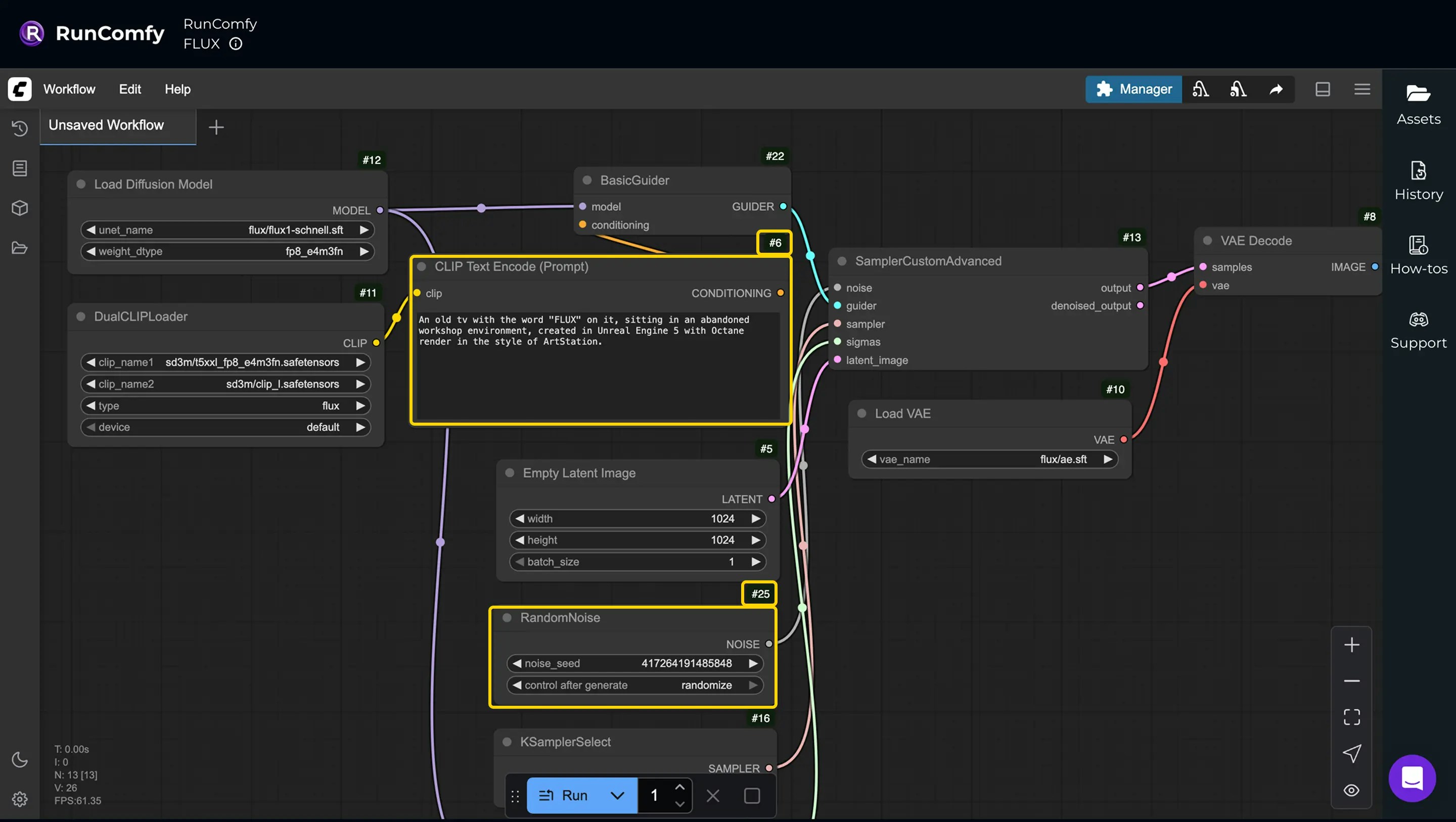
For inference requests, RunComfy uses the deployment’s saved `workflow_api.json` as the base. You usually send only an `overrides` object to customize specific inputs (prompt, seed, media URLs, etc.).
Here’s an example override payload for this workflow:
### Build an overrides object
For inference requests, RunComfy uses the deployment’s saved `workflow_api.json` as the base. You usually send only an `overrides` object to customize specific inputs (prompt, seed, media URLs, etc.).
Here’s an example override payload for this workflow:
 ```json theme={null}
{
"overrides": {
"6": {
"inputs": {
"text": "Your custom prompt here"
}
},
"25": {
"inputs": {
"noise_seed": 123456789
}
}
}
}
```
For the full request lifecycle and override rules, see **[Async Queue Endpoints](/serverless/async-queue-endpoints)**.
***
## Step 2: Deploy the workflow as an API
Go to the [Deployments](https://www.runcomfy.com/comfyui-api/deployments) page and select **Deploy workflow as API**.
Search for the workflow by its name (**RunComfy/FLUX**) or ID (`00000000-0000-0000-0000-000000001111`).
For a quick setup, choose **Instant Deploy**, which uses default settings like 48GB hardware (A6000) and autoscaling. These settings can be adjusted later.
After the deployment is complete, copy the `deployment_id` — you’ll need it for API calls.
***
## Step 3: Authenticate
All API calls require a Bearer token.
Add this header to every request (replace `` with your API key):
`Authorization: Bearer `
Get your API token from the [Profile](https://www.runcomfy.com/profile) page (click your avatar in the upper-right).
***
## Step 4: Submit a request
Send a POST request to the inference endpoint, replacing `{deployment_id}` with your actual deployment ID.
In the request body, include the overrides you prepared in Step 1 under the `overrides` field.
```bash theme={null}
curl --request POST \
--url https://api.runcomfy.net/prod/v2/deployments/{deployment_id}/inference \
--header "Content-Type: application/json" \
--header "Authorization: Bearer " \
--data '{
"overrides": {
"6": {
"inputs": {
"text": "Your custom prompt here"
}
},
"25": {
"inputs": {
"noise_seed": 123456789
}
}
}
}'
```
**Expected response:**
```json theme={null}
{
"request_id": "{request_id}",
"status_url": "https://api.runcomfy.net/prod/v2/deployments/{deployment_id}/requests/{request_id}/status",
"result_url": "https://api.runcomfy.net/prod/v2/deployments/{deployment_id}/requests/{request_id}/result",
"cancel_url": "https://api.runcomfy.net/prod/v2/deployments/{deployment_id}/requests/{request_id}/cancel"
}
```
***
## Image/video inputs
If your workflow needs an image or video input, you can pass media in `overrides` using either:
* a **public HTTPS URL**, or
* a **Base64 data URI**
(Replace the node ID and input name with what your workflow expects.)
### Using a public URL
```bash theme={null}
curl --request POST \
--url https://api.runcomfy.net/prod/v2/deployments/{deployment_id}/inference \
--header "Content-Type: application/json" \
--header "Authorization: Bearer " \
--data '{
"overrides": {
"189": {
"inputs": {
"image": "https://example.com/new-image.jpg"
}
}
}
}'
```
### Using a Base64 data URI
```bash theme={null}
curl --request POST \
--url https://api.runcomfy.net/prod/v2/deployments/{deployment_id}/inference \
--header "Content-Type: application/json" \
--header "Authorization: Bearer " \
--data '{
"overrides": {
"189": {
"inputs": {
"image": "data:image/jpeg;base64,/9j/4AAQSkZJRgABAQEASABIAAD..."
}
}
}
}'
```
For the full set of upload rules and limits, see **[Async Queue Endpoints](/serverless/async-queue-endpoints)** (Request Example – Image/Video).
***
## Core API nodes
If your workflow uses ComfyUI Core API nodes that require an API key, send the Comfy Org API Key in the request body as shown here: **[Async Queue Endpoints – Request Example (API Nodes)](/serverless/async-queue-endpoints#request-example-api-nodes)**.
***
## Step 5: Monitor and retrieve results
After submitting a request, you can track its progress and fetch outputs once it’s ready.
### Check request status
Poll `status_url` until the status becomes `"completed"`:
```bash theme={null}
curl --request GET \
--url https://api.runcomfy.net/prod/v2/deployments/{deployment_id}/requests/{request_id}/status \
--header "Authorization: Bearer "
```
**Example response:**
```json theme={null}
{
"status": "in_queue",
"queue_position": 0,
"result_url": "https://api.runcomfy.net/prod/v2/deployments/{deployment_id}/requests/{request_id}/result"
}
```
### Retrieve request results
**All results from the Serverless API are automatically deleted after 7 days. If you need long-term storage, save the results elsewhere. If you need the opposite — immediate deletion of inputs and outputs after you have streamed the result to your user — call `DELETE /prod/v2/deployments/{deployment_id}/requests/{request_id}` (see [Delete a request](/serverless/async-queue-endpoints#delete-a-request)).**
```bash theme={null}
curl --request GET \
--url https://api.runcomfy.net/prod/v2/deployments/{deployment_id}/requests/{request_id}/result \
--header "Authorization: Bearer "
```
**Example response:**
```json theme={null}
{
"status": "succeeded",
"outputs": {
"136": {
"images": [
{
"url": "https://example.com/ComfyUI_00001_.png",
"filename": "ComfyUI_00001_.png",
"subfolder": "",
"type": "output"
}
]
}
},
"created_at": "2025-07-22T13:05:16.143086",
"finished_at": "2025-07-22T13:13:03.624471"
}
```
***
## Webhooks (optional)
Instead of polling, you can also use **[Webhooks](/serverless/webhooks)** to receive progress and final result updates.
```json theme={null}
{
"overrides": {
"6": {
"inputs": {
"text": "Your custom prompt here"
}
},
"25": {
"inputs": {
"noise_seed": 123456789
}
}
}
}
```
For the full request lifecycle and override rules, see **[Async Queue Endpoints](/serverless/async-queue-endpoints)**.
***
## Step 2: Deploy the workflow as an API
Go to the [Deployments](https://www.runcomfy.com/comfyui-api/deployments) page and select **Deploy workflow as API**.
Search for the workflow by its name (**RunComfy/FLUX**) or ID (`00000000-0000-0000-0000-000000001111`).
For a quick setup, choose **Instant Deploy**, which uses default settings like 48GB hardware (A6000) and autoscaling. These settings can be adjusted later.
After the deployment is complete, copy the `deployment_id` — you’ll need it for API calls.
***
## Step 3: Authenticate
All API calls require a Bearer token.
Add this header to every request (replace `` with your API key):
`Authorization: Bearer `
Get your API token from the [Profile](https://www.runcomfy.com/profile) page (click your avatar in the upper-right).
***
## Step 4: Submit a request
Send a POST request to the inference endpoint, replacing `{deployment_id}` with your actual deployment ID.
In the request body, include the overrides you prepared in Step 1 under the `overrides` field.
```bash theme={null}
curl --request POST \
--url https://api.runcomfy.net/prod/v2/deployments/{deployment_id}/inference \
--header "Content-Type: application/json" \
--header "Authorization: Bearer " \
--data '{
"overrides": {
"6": {
"inputs": {
"text": "Your custom prompt here"
}
},
"25": {
"inputs": {
"noise_seed": 123456789
}
}
}
}'
```
**Expected response:**
```json theme={null}
{
"request_id": "{request_id}",
"status_url": "https://api.runcomfy.net/prod/v2/deployments/{deployment_id}/requests/{request_id}/status",
"result_url": "https://api.runcomfy.net/prod/v2/deployments/{deployment_id}/requests/{request_id}/result",
"cancel_url": "https://api.runcomfy.net/prod/v2/deployments/{deployment_id}/requests/{request_id}/cancel"
}
```
***
## Image/video inputs
If your workflow needs an image or video input, you can pass media in `overrides` using either:
* a **public HTTPS URL**, or
* a **Base64 data URI**
(Replace the node ID and input name with what your workflow expects.)
### Using a public URL
```bash theme={null}
curl --request POST \
--url https://api.runcomfy.net/prod/v2/deployments/{deployment_id}/inference \
--header "Content-Type: application/json" \
--header "Authorization: Bearer " \
--data '{
"overrides": {
"189": {
"inputs": {
"image": "https://example.com/new-image.jpg"
}
}
}
}'
```
### Using a Base64 data URI
```bash theme={null}
curl --request POST \
--url https://api.runcomfy.net/prod/v2/deployments/{deployment_id}/inference \
--header "Content-Type: application/json" \
--header "Authorization: Bearer " \
--data '{
"overrides": {
"189": {
"inputs": {
"image": "data:image/jpeg;base64,/9j/4AAQSkZJRgABAQEASABIAAD..."
}
}
}
}'
```
For the full set of upload rules and limits, see **[Async Queue Endpoints](/serverless/async-queue-endpoints)** (Request Example – Image/Video).
***
## Core API nodes
If your workflow uses ComfyUI Core API nodes that require an API key, send the Comfy Org API Key in the request body as shown here: **[Async Queue Endpoints – Request Example (API Nodes)](/serverless/async-queue-endpoints#request-example-api-nodes)**.
***
## Step 5: Monitor and retrieve results
After submitting a request, you can track its progress and fetch outputs once it’s ready.
### Check request status
Poll `status_url` until the status becomes `"completed"`:
```bash theme={null}
curl --request GET \
--url https://api.runcomfy.net/prod/v2/deployments/{deployment_id}/requests/{request_id}/status \
--header "Authorization: Bearer "
```
**Example response:**
```json theme={null}
{
"status": "in_queue",
"queue_position": 0,
"result_url": "https://api.runcomfy.net/prod/v2/deployments/{deployment_id}/requests/{request_id}/result"
}
```
### Retrieve request results
**All results from the Serverless API are automatically deleted after 7 days. If you need long-term storage, save the results elsewhere. If you need the opposite — immediate deletion of inputs and outputs after you have streamed the result to your user — call `DELETE /prod/v2/deployments/{deployment_id}/requests/{request_id}` (see [Delete a request](/serverless/async-queue-endpoints#delete-a-request)).**
```bash theme={null}
curl --request GET \
--url https://api.runcomfy.net/prod/v2/deployments/{deployment_id}/requests/{request_id}/result \
--header "Authorization: Bearer "
```
**Example response:**
```json theme={null}
{
"status": "succeeded",
"outputs": {
"136": {
"images": [
{
"url": "https://example.com/ComfyUI_00001_.png",
"filename": "ComfyUI_00001_.png",
"subfolder": "",
"type": "output"
}
]
}
},
"created_at": "2025-07-22T13:05:16.143086",
"finished_at": "2025-07-22T13:13:03.624471"
}
```
***
## Webhooks (optional)
Instead of polling, you can also use **[Webhooks](/serverless/webhooks)** to receive progress and final result updates.