> ## Documentation Index
> Fetch the complete documentation index at: https://docs.runcomfy.com/llms.txt
> Use this file to discover all available pages before exploring further.
# Async Queue Endpoints - Training Jobs
These endpoints let you submit and monitor **AI Toolkit** training jobs (typically LoRA training), then download training artifacts (checkpoints, config yaml, samples) as hosted URLs.
***
## Endpoints
**Base URL**: `https://trainer-api.runcomfy.net`
| Endpoint | Method | Description |
| --------------------------------------------------- | ------ | ------------------------------------------------- |
| `/prod/v1/trainers/ai-toolkit/jobs` | `POST` | Submit a training job |
| `/prod/v1/trainers/ai-toolkit/jobs/{job_id}/status` | `GET` | Check status |
| `/prod/v1/trainers/ai-toolkit/jobs/{job_id}/result` | `GET` | Retrieve training results (artifacts/checkpoints) |
| `/prod/v1/trainers/ai-toolkit/jobs/{job_id}/cancel` | `POST` | Cancel a queued/running job |
| `/prod/v1/trainers/ai-toolkit/jobs/{job_id}/resume` | `POST` | Resume from the latest checkpoint (if available) |
| `/prod/v1/trainers/ai-toolkit/jobs/{job_id}/edit` | `POST` | Edit config of a non-running job |
***
## Quickstart (minimum working flow)
1. **Create + upload a dataset** (Dataset API) until it becomes `READY`. See: **[Training Datasets API](/trainer-apis/async-queue-endpoints-datasets)**
2. Write an **AI Toolkit YAML config** that references dataset paths in the mounted dataset folder.
3. Submit a training job with your `config_file` and required `gpu_type`.
4. Poll `status` and fetch `result` artifacts.
***
## Preparing your config file.
Before submit your request, you need to save your AI Toolkit config as `config.yaml`.
Your `config.yaml` is the full AI Toolkit YAML configuration for the training job (model/quantization/train/sample settings, etc.). You should set the parameters you need for your training run in this file first.
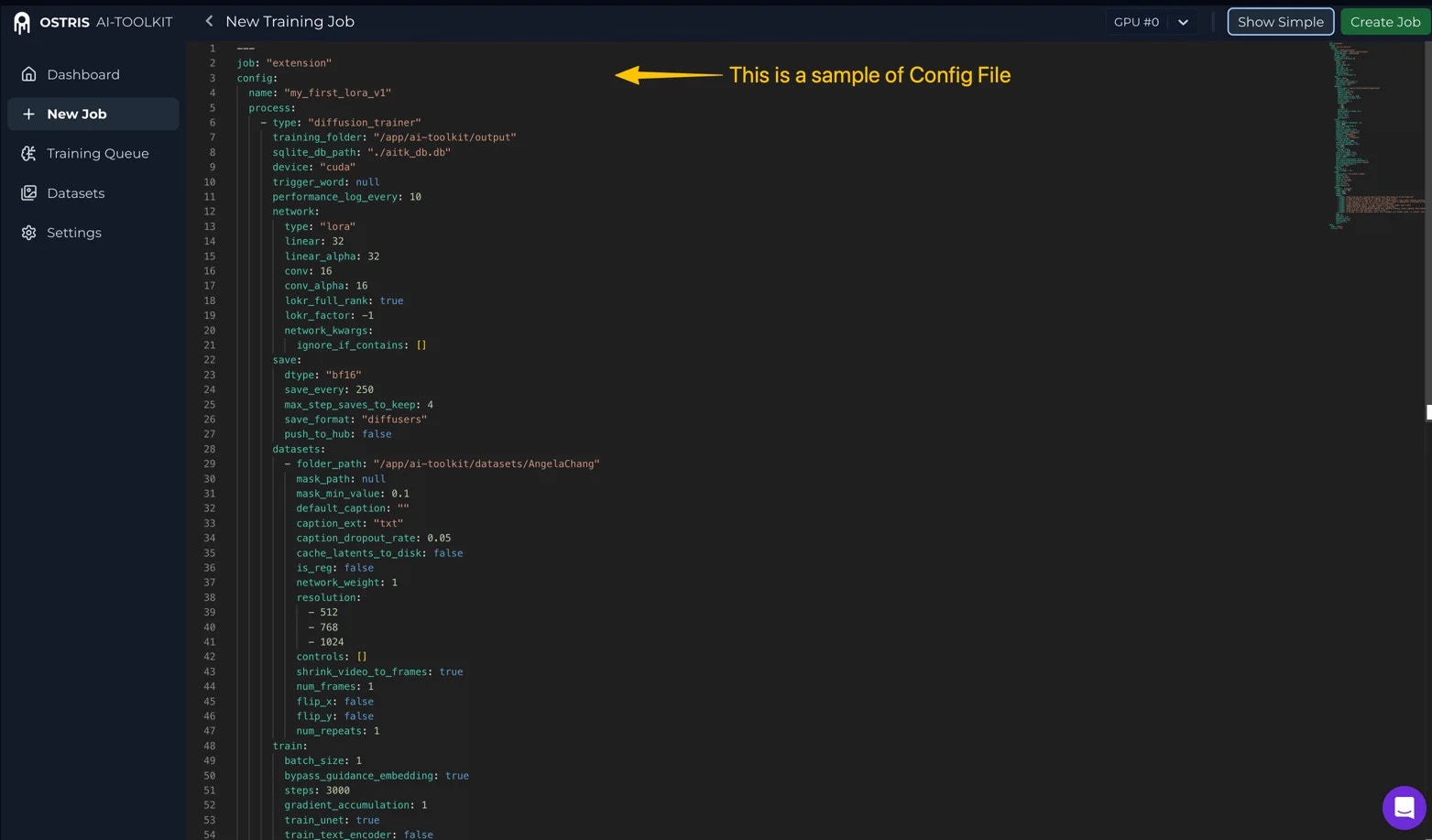 Below is the dataset path portion inside `config_file`. This is how the dataset is mounted into the training job and referenced by the AI Toolkit config:
* `training_folder` must be **`/app/ai-toolkit/output`** (fixed; do not change)
* `folder_path` must be **`/app/ai-toolkit/datasets/{dataset_name}`** (fixed prefix; only `{dataset_name}` changes)
This is an example for part of YAML snippet:
```yaml theme={null}
job: extension
config:
name: "trainingjobname1"
process:
- save:
datasets:
folder_path: "/app/ai-toolkit/datasets/{dataset_name}"
# ... other datasets config ...
training_folder: "/app/ai-toolkit/output"
# ... your model/network/train/sample config ...
meta:
name: "[name]"
```
**Important details:**
* `{dataset_name}` is your dataset’s **`name`** from the Dataset API response (or from `GET /prod/v1/trainers/datasets`).
## Submit a training job
Submit a new AI Toolkit training job (typically LoRA training) to the async queue. The job will mount your `READY` dataset and run the YAML config you provide.
```
POST /prod/v1/trainers/ai-toolkit/jobs
```
### Request body (important fields)
| Field | Type | Required | Description |
| -------------------- | ------- | -------- | --------------------------------------------------------------------------------------------------------------------------------------------------------------------------------------------------------- |
| `config_file_format` | string | ✅ | Must be `yaml` |
| `config_file` | string | ✅ | Full AI Toolkit YAML config file (as a JSON string) . Note: `config_file` is **multiline YAML** but the Trainer API request body is JSON, you must **JSON-escape** the YAML into a string before sending. |
| `gpu_type` | string | ✅ | Supported values: `ADA_80_PLUS` (RunComfy Trainer UI: **H100**) or `HOPPER_141` (RunComfy Trainer UI: **H200**) |
| `gpu_count` | integer | ❌ | Number of GPUs. `1` for single-GPU (default), `8` for multi-GPU. Multi-GPU (`8`) is currently only supported for `ADA_80_PLUS` (H100). |
### Request example
```bash theme={null}
curl --request POST \
--url "https://trainer-api.runcomfy.net/prod/v1/trainers/ai-toolkit/jobs" \
--header "Content-Type: application/json" \
--header "Authorization: Bearer " \
--data '{
"config_file_format": "yaml",
"config_file": "",
"gpu_type": "ADA_80_PLUS",
"gpu_id":"#1"
}'
```
### Response
```json theme={null}
{
"id": "{job_id}",
"name": "{job_name}",
"status_url": "https://trainer-api.runcomfy.net/prod/v1/trainers/ai-toolkit/jobs/{job_id}/status",
"result_url": "https://trainer-api.runcomfy.net/prod/v1/trainers/ai-toolkit/jobs/{job_id}/result",
"cancel_url": "https://trainer-api.runcomfy.net/prod/v1/trainers/ai-toolkit/jobs/{job_id}/cancel"
}
```
***
## Monitor training job status
Use this endpoint to check a training job’s current status and progress. Poll it periodically to track the lifecycle and decide when to fetch results or take action.
A typical lifecycle is:
`IN_QUEUE` → `RUNNING` → `STOPPED` (or `FAILED` or `CANCELED`)
### Training job status values
* **`IN_QUEUE`**: Job is accepted and waiting in the queue
* **`RUNNING`**: Training is currently running
* **`STOPPED`**: Training has stopped without an error (typically completed successfully, or stopped due to preemption)
* **`FAILED`**: Training has stopped due to an error; the response includes an `error` field describing what went wrong (for example, AI Toolkit training errors, or the job stopping due to insufficient account balance)
* **`CANCELED`**: Job was canceled by the user
```
GET /prod/v1/trainers/ai-toolkit/jobs/{job_id}/status
```
### Request example
```bash theme={null}
curl --request GET \
--url "https://trainer-api.runcomfy.net/prod/v1/trainers/ai-toolkit/jobs/{job_id}/status" \
--header "Authorization: Bearer "
```
### Response example
```json theme={null}
{
"id": "{job_id}",
"name": "{job_name}",
"status": "RUNNING",
"progress": {
"current_step": 320,
"total_steps": 2000,
"percent": 16
},
"result_url": "https://trainer-api.runcomfy.net/prod/v1/trainers/ai-toolkit/jobs/{job_id}/result",
"cancel_url": "https://trainer-api.runcomfy.net/prod/v1/trainers/ai-toolkit/jobs/{job_id}/cancel"
}
```
***
## Retrieve training job results
Use this endpoint to retrieve the latest artifacts produced by a training job (checkpoints, resolved config, samples) as hosted URLs. It can be called while the job is still `RUNNING` to fetch whatever is available so far. If the job ends in `FAILED`, you can still call this endpoint to download any artifacts that were produced before the failure (if any).
**Note**: If the training process has already produced checkpoints/samples, the response will include whatever is available so far. The artifacts list will grow over time while the job is running.
```
GET /prod/v1/trainers/ai-toolkit/jobs/{job_id}/result
```
### Request example
```bash theme={null}
curl --request GET \
--url "https://trainer-api.runcomfy.net/prod/v1/trainers/ai-toolkit/jobs/{job_id}/result" \
--header "Authorization: Bearer "
```
### Response example
```json theme={null}
{
"id": "{job_id}",
"name": "{job_name}",
"status": "STOPPED",
"artifacts": {
"checkpoints": [
{
"path": "https://example.com/output/dog_portrait_lora_00000100.safetensors"
},
{
"path": "https://example.com/output/dog_portrait_lora_00000200.safetensors"
}
],
"config": {
"path": "https://example.com/output/resolved_config.yaml"
},
"samples": [
{
"sample_index": 1,
"type": "image",
"step": 2000,
"seed": 42,
"prompt": "",
"control_image": [],
"path": "https://example.com/output/samples/step_2000.png"
}
]
},
"created_at": "2026-01-31T12:00:00.143086",
"started_at": "2026-01-31T12:03:10.143086",
"finished_at": "2026-01-31T16:12:34.143086"
}
```
***
## Cancel a job
Use this endpoint to cancel a training job that is currently queued (`IN_QUEUE`) or executing (`RUNNING`). Cancellation stops further progress, but you can still retrieve any artifacts produced so far via the result endpoint.
**Note**: After canceling, you can still call `GET .../result` to retrieve any artifacts produced so far.
```
POST /prod/v1/trainers/ai-toolkit/jobs/{job_id}/cancel
```
### Request example
```bash theme={null}
curl --request POST \
--url "https://trainer-api.runcomfy.net/prod/v1/trainers/ai-toolkit/jobs/{job_id}/cancel" \
--header "Authorization: Bearer "
```
### Response example
```json theme={null}
{
"id": "{job_id}",
"name": "{job_name}",
"status": "CANCELED"
}
```
***
## Resume a training job
Use this endpoint to resume a training job from its latest checkpoint (if available). This is useful when a job is `STOPPED` (for example, preemption) but has already produced checkpoints. If a job is `FAILED`, inspect the `error` field from the status endpoint to understand and fix the underlying issue.
**Note**:
* **It reuses the same `job_id`** (does not create a new job).
* When resuming, RunComfy will start from the **latest checkpoint** (the highest-step checkpoint). If no checkpoint exists, the job will start from **step 0**.
```
POST /prod/v1/trainers/ai-toolkit/jobs/{job_id}/resume
```
### Request example
```bash theme={null}
curl --request POST \
--url "https://trainer-api.runcomfy.net/prod/v1/trainers/ai-toolkit/jobs/{job_id}/resume" \
--header "Content-Type: application/json" \
--header "Authorization: Bearer " \
--data '{}'
```
### Response example
```json theme={null}
{
"id": "{job_id}",
"name": "{job_name}",
"status_url": "https://trainer-api.runcomfy.net/prod/v1/trainers/ai-toolkit/jobs/{job_id}/status",
"result_url": "https://trainer-api.runcomfy.net/prod/v1/trainers/ai-toolkit/jobs/{job_id}/result",
"cancel_url": "https://trainer-api.runcomfy.net/prod/v1/trainers/ai-toolkit/jobs/{job_id}/cancel"
}
```
***
## Edit a training job
Use this endpoint to edit the training configuration of a non-running job. This allows updating `config_file` on a job that is currently `STOPPED`, `CANCELED`, or `FAILED`. GPU type and count are determined when you resume the job.
**Note**:
* The config name (`config.name`) **cannot be changed** via edit. It must remain the same as the original job.
* After editing, call `POST .../resume` to re-queue the job with the updated configuration.
```
POST /prod/v1/trainers/ai-toolkit/jobs/{job_id}/edit
```
### Request body
| Field | Type | Required | Description |
| -------------------- | ------ | -------- | ---------------------------------------------------------------------------------------------------------- |
| `config_file_format` | string | ✅ | Must be `yaml` |
| `config_file` | string | ✅ | Full AI Toolkit YAML config file (as a JSON string). Note: `config.name` must match the original job name. |
### Request example
```bash theme={null}
curl --request POST \
--url "https://trainer-api.runcomfy.net/prod/v1/trainers/ai-toolkit/jobs/{job_id}/edit" \
--header "Content-Type: application/json" \
--header "Authorization: Bearer " \
--data '{
"config_file_format": "yaml",
"config_file": ""
}'
```
### Response example
```json theme={null}
{
"id": "{job_id}",
"name": "{job_name}",
"status": "STOPPED",
"status_url": "https://trainer-api.runcomfy.net/prod/v1/trainers/ai-toolkit/jobs/{job_id}/status",
"result_url": "https://trainer-api.runcomfy.net/prod/v1/trainers/ai-toolkit/jobs/{job_id}/result",
"cancel_url": "https://trainer-api.runcomfy.net/prod/v1/trainers/ai-toolkit/jobs/{job_id}/cancel"
}
```
Below is the dataset path portion inside `config_file`. This is how the dataset is mounted into the training job and referenced by the AI Toolkit config:
* `training_folder` must be **`/app/ai-toolkit/output`** (fixed; do not change)
* `folder_path` must be **`/app/ai-toolkit/datasets/{dataset_name}`** (fixed prefix; only `{dataset_name}` changes)
This is an example for part of YAML snippet:
```yaml theme={null}
job: extension
config:
name: "trainingjobname1"
process:
- save:
datasets:
folder_path: "/app/ai-toolkit/datasets/{dataset_name}"
# ... other datasets config ...
training_folder: "/app/ai-toolkit/output"
# ... your model/network/train/sample config ...
meta:
name: "[name]"
```
**Important details:**
* `{dataset_name}` is your dataset’s **`name`** from the Dataset API response (or from `GET /prod/v1/trainers/datasets`).
## Submit a training job
Submit a new AI Toolkit training job (typically LoRA training) to the async queue. The job will mount your `READY` dataset and run the YAML config you provide.
```
POST /prod/v1/trainers/ai-toolkit/jobs
```
### Request body (important fields)
| Field | Type | Required | Description |
| -------------------- | ------- | -------- | --------------------------------------------------------------------------------------------------------------------------------------------------------------------------------------------------------- |
| `config_file_format` | string | ✅ | Must be `yaml` |
| `config_file` | string | ✅ | Full AI Toolkit YAML config file (as a JSON string) . Note: `config_file` is **multiline YAML** but the Trainer API request body is JSON, you must **JSON-escape** the YAML into a string before sending. |
| `gpu_type` | string | ✅ | Supported values: `ADA_80_PLUS` (RunComfy Trainer UI: **H100**) or `HOPPER_141` (RunComfy Trainer UI: **H200**) |
| `gpu_count` | integer | ❌ | Number of GPUs. `1` for single-GPU (default), `8` for multi-GPU. Multi-GPU (`8`) is currently only supported for `ADA_80_PLUS` (H100). |
### Request example
```bash theme={null}
curl --request POST \
--url "https://trainer-api.runcomfy.net/prod/v1/trainers/ai-toolkit/jobs" \
--header "Content-Type: application/json" \
--header "Authorization: Bearer " \
--data '{
"config_file_format": "yaml",
"config_file": "",
"gpu_type": "ADA_80_PLUS",
"gpu_id":"#1"
}'
```
### Response
```json theme={null}
{
"id": "{job_id}",
"name": "{job_name}",
"status_url": "https://trainer-api.runcomfy.net/prod/v1/trainers/ai-toolkit/jobs/{job_id}/status",
"result_url": "https://trainer-api.runcomfy.net/prod/v1/trainers/ai-toolkit/jobs/{job_id}/result",
"cancel_url": "https://trainer-api.runcomfy.net/prod/v1/trainers/ai-toolkit/jobs/{job_id}/cancel"
}
```
***
## Monitor training job status
Use this endpoint to check a training job’s current status and progress. Poll it periodically to track the lifecycle and decide when to fetch results or take action.
A typical lifecycle is:
`IN_QUEUE` → `RUNNING` → `STOPPED` (or `FAILED` or `CANCELED`)
### Training job status values
* **`IN_QUEUE`**: Job is accepted and waiting in the queue
* **`RUNNING`**: Training is currently running
* **`STOPPED`**: Training has stopped without an error (typically completed successfully, or stopped due to preemption)
* **`FAILED`**: Training has stopped due to an error; the response includes an `error` field describing what went wrong (for example, AI Toolkit training errors, or the job stopping due to insufficient account balance)
* **`CANCELED`**: Job was canceled by the user
```
GET /prod/v1/trainers/ai-toolkit/jobs/{job_id}/status
```
### Request example
```bash theme={null}
curl --request GET \
--url "https://trainer-api.runcomfy.net/prod/v1/trainers/ai-toolkit/jobs/{job_id}/status" \
--header "Authorization: Bearer "
```
### Response example
```json theme={null}
{
"id": "{job_id}",
"name": "{job_name}",
"status": "RUNNING",
"progress": {
"current_step": 320,
"total_steps": 2000,
"percent": 16
},
"result_url": "https://trainer-api.runcomfy.net/prod/v1/trainers/ai-toolkit/jobs/{job_id}/result",
"cancel_url": "https://trainer-api.runcomfy.net/prod/v1/trainers/ai-toolkit/jobs/{job_id}/cancel"
}
```
***
## Retrieve training job results
Use this endpoint to retrieve the latest artifacts produced by a training job (checkpoints, resolved config, samples) as hosted URLs. It can be called while the job is still `RUNNING` to fetch whatever is available so far. If the job ends in `FAILED`, you can still call this endpoint to download any artifacts that were produced before the failure (if any).
**Note**: If the training process has already produced checkpoints/samples, the response will include whatever is available so far. The artifacts list will grow over time while the job is running.
```
GET /prod/v1/trainers/ai-toolkit/jobs/{job_id}/result
```
### Request example
```bash theme={null}
curl --request GET \
--url "https://trainer-api.runcomfy.net/prod/v1/trainers/ai-toolkit/jobs/{job_id}/result" \
--header "Authorization: Bearer "
```
### Response example
```json theme={null}
{
"id": "{job_id}",
"name": "{job_name}",
"status": "STOPPED",
"artifacts": {
"checkpoints": [
{
"path": "https://example.com/output/dog_portrait_lora_00000100.safetensors"
},
{
"path": "https://example.com/output/dog_portrait_lora_00000200.safetensors"
}
],
"config": {
"path": "https://example.com/output/resolved_config.yaml"
},
"samples": [
{
"sample_index": 1,
"type": "image",
"step": 2000,
"seed": 42,
"prompt": "",
"control_image": [],
"path": "https://example.com/output/samples/step_2000.png"
}
]
},
"created_at": "2026-01-31T12:00:00.143086",
"started_at": "2026-01-31T12:03:10.143086",
"finished_at": "2026-01-31T16:12:34.143086"
}
```
***
## Cancel a job
Use this endpoint to cancel a training job that is currently queued (`IN_QUEUE`) or executing (`RUNNING`). Cancellation stops further progress, but you can still retrieve any artifacts produced so far via the result endpoint.
**Note**: After canceling, you can still call `GET .../result` to retrieve any artifacts produced so far.
```
POST /prod/v1/trainers/ai-toolkit/jobs/{job_id}/cancel
```
### Request example
```bash theme={null}
curl --request POST \
--url "https://trainer-api.runcomfy.net/prod/v1/trainers/ai-toolkit/jobs/{job_id}/cancel" \
--header "Authorization: Bearer "
```
### Response example
```json theme={null}
{
"id": "{job_id}",
"name": "{job_name}",
"status": "CANCELED"
}
```
***
## Resume a training job
Use this endpoint to resume a training job from its latest checkpoint (if available). This is useful when a job is `STOPPED` (for example, preemption) but has already produced checkpoints. If a job is `FAILED`, inspect the `error` field from the status endpoint to understand and fix the underlying issue.
**Note**:
* **It reuses the same `job_id`** (does not create a new job).
* When resuming, RunComfy will start from the **latest checkpoint** (the highest-step checkpoint). If no checkpoint exists, the job will start from **step 0**.
```
POST /prod/v1/trainers/ai-toolkit/jobs/{job_id}/resume
```
### Request example
```bash theme={null}
curl --request POST \
--url "https://trainer-api.runcomfy.net/prod/v1/trainers/ai-toolkit/jobs/{job_id}/resume" \
--header "Content-Type: application/json" \
--header "Authorization: Bearer " \
--data '{}'
```
### Response example
```json theme={null}
{
"id": "{job_id}",
"name": "{job_name}",
"status_url": "https://trainer-api.runcomfy.net/prod/v1/trainers/ai-toolkit/jobs/{job_id}/status",
"result_url": "https://trainer-api.runcomfy.net/prod/v1/trainers/ai-toolkit/jobs/{job_id}/result",
"cancel_url": "https://trainer-api.runcomfy.net/prod/v1/trainers/ai-toolkit/jobs/{job_id}/cancel"
}
```
***
## Edit a training job
Use this endpoint to edit the training configuration of a non-running job. This allows updating `config_file` on a job that is currently `STOPPED`, `CANCELED`, or `FAILED`. GPU type and count are determined when you resume the job.
**Note**:
* The config name (`config.name`) **cannot be changed** via edit. It must remain the same as the original job.
* After editing, call `POST .../resume` to re-queue the job with the updated configuration.
```
POST /prod/v1/trainers/ai-toolkit/jobs/{job_id}/edit
```
### Request body
| Field | Type | Required | Description |
| -------------------- | ------ | -------- | ---------------------------------------------------------------------------------------------------------- |
| `config_file_format` | string | ✅ | Must be `yaml` |
| `config_file` | string | ✅ | Full AI Toolkit YAML config file (as a JSON string). Note: `config.name` must match the original job name. |
### Request example
```bash theme={null}
curl --request POST \
--url "https://trainer-api.runcomfy.net/prod/v1/trainers/ai-toolkit/jobs/{job_id}/edit" \
--header "Content-Type: application/json" \
--header "Authorization: Bearer " \
--data '{
"config_file_format": "yaml",
"config_file": ""
}'
```
### Response example
```json theme={null}
{
"id": "{job_id}",
"name": "{job_name}",
"status": "STOPPED",
"status_url": "https://trainer-api.runcomfy.net/prod/v1/trainers/ai-toolkit/jobs/{job_id}/status",
"result_url": "https://trainer-api.runcomfy.net/prod/v1/trainers/ai-toolkit/jobs/{job_id}/result",
"cancel_url": "https://trainer-api.runcomfy.net/prod/v1/trainers/ai-toolkit/jobs/{job_id}/cancel"
}
```