
Endpoints
Base URL:https://trainer-api.runcomfy.net
Quickstart (minimum working flow)
- Create + upload a dataset (Dataset API) until it becomes
READY. See: Training Datasets API - Write an AI Toolkit YAML config that references dataset paths in the mounted dataset folder.
- Submit a training job with your
config_fileand requiredgpu_type. - Poll
statusand fetchresultartifacts.
Preparing your config file.
Before submit your request, you need to save your AI Toolkit config asconfig.yaml.
Your config.yaml is the full AI Toolkit YAML configuration for the training job (model/quantization/train/sample settings, etc.). You should set the parameters you need for your training run in this file first.
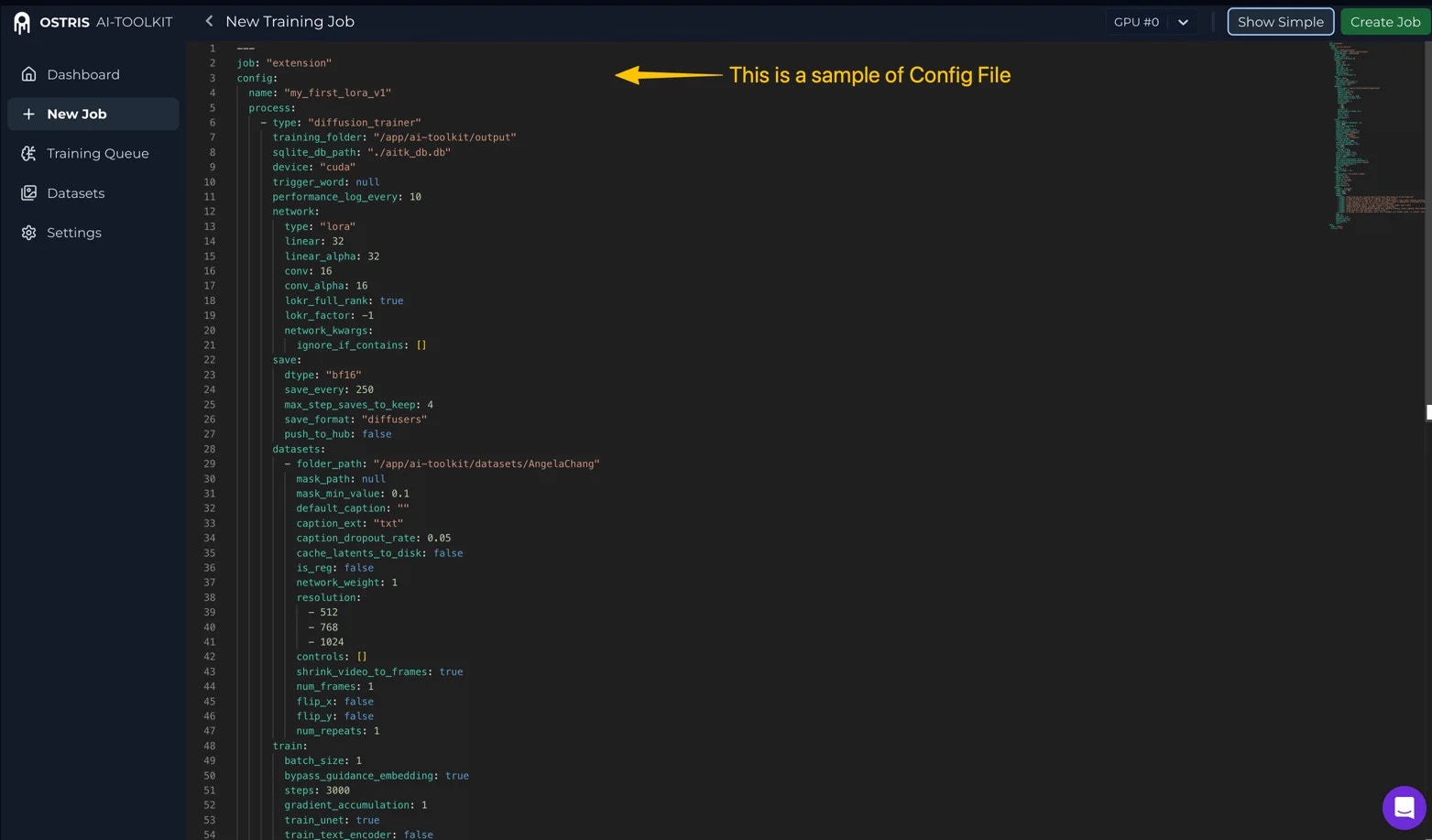
config_file. This is how the dataset is mounted into the training job and referenced by the AI Toolkit config:
training_foldermust be/app/ai-toolkit/output(fixed; do not change)folder_pathmust be/app/ai-toolkit/datasets/{dataset_name}(fixed prefix; only{dataset_name}changes)
{dataset_name}is your dataset’snamefrom the Dataset API response (or fromGET /prod/v1/trainers/datasets).
Submit a training job
Submit a new AI Toolkit training job (typically LoRA training) to the async queue. The job will mount yourREADY dataset and run the YAML config you provide.
Request body (important fields)
Request example
Response
Monitor training job status
Use this endpoint to check a training job’s current status and progress. Poll it periodically to track the lifecycle and decide when to fetch results or take action. A typical lifecycle is:IN_QUEUE → RUNNING → STOPPED (or FAILED or CANCELED)
Training job status values
IN_QUEUE: Job is accepted and waiting in the queueRUNNING: Training is currently runningSTOPPED: Training has stopped without an error (typically completed successfully, or stopped due to preemption)FAILED: Training has stopped due to an error; the response includes anerrorfield describing what went wrong (for example, AI Toolkit training errors, or the job stopping due to insufficient account balance)CANCELED: Job was canceled by the user
Request example
Response example
Retrieve training job results
Use this endpoint to retrieve the latest artifacts produced by a training job (checkpoints, resolved config, samples) as hosted URLs. It can be called while the job is stillRUNNING to fetch whatever is available so far. If the job ends in FAILED, you can still call this endpoint to download any artifacts that were produced before the failure (if any).
Note: If the training process has already produced checkpoints/samples, the response will include whatever is available so far. The artifacts list will grow over time while the job is running.
Request example
Response example
Cancel a job
Use this endpoint to cancel a training job that is currently queued (IN_QUEUE) or executing (RUNNING). Cancellation stops further progress, but you can still retrieve any artifacts produced so far via the result endpoint.
Note: After canceling, you can still call GET .../result to retrieve any artifacts produced so far.
Request example
Response example
Resume a training job
Use this endpoint to resume a training job from its latest checkpoint (if available). This is useful when a job isSTOPPED (for example, preemption) but has already produced checkpoints. If a job is FAILED, inspect the error field from the status endpoint to understand and fix the underlying issue.
Note:
-
It reuses the same
job_id(does not create a new job). - When resuming, RunComfy will start from the latest checkpoint (the highest-step checkpoint). If no checkpoint exists, the job will start from step 0.
Request example
Response example
Edit a training job
Use this endpoint to edit the training configuration of a non-running job. This allows updatingconfig_file on a job that is currently STOPPED, CANCELED, or FAILED. GPU type and count are determined when you resume the job.
Note:
-
The config name (
config.name) cannot be changed via edit. It must remain the same as the original job. -
After editing, call
POST .../resumeto re-queue the job with the updated configuration.