
error_code and message.
This page lists error codes you may see when calling the Trainer API, including datasets (create/upload/processing) and AI Toolkit training jobs (submit/status/result).
If you haven’t yet, start with:
Error code structure
Trainer API error codes follow a consistent numeric pattern:- The first 3 digits match the HTTP status (e.g.
400xx,422xx,500xx). - The last 2 digits are a resource-specific sequence:
01–49: Dataset errors51–99: Job errors
Dataset API error codes
Applies to endpoints under/prod/v1/trainers/datasets (create/upload/status/list/delete).
40001 INVALID_DATASET_ID
Meaning: The supplied dataset identifier is not a valid UUID. Where you may see it: Any endpoint that takes{dataset_id} in the URL path.
What to try:
- Use the exact
idreturned byPOST /prod/v1/trainers/datasets(or listed byGET /prod/v1/trainers/datasets). - Make sure you didn’t accidentally pass a dataset name where a dataset id is required.
40401 DATASET_NOT_FOUND
Meaning: Dataset does not exist, was deleted, or is not owned by the caller. Where you may see it: Any endpoint that takes{dataset_id} in the URL path.
What to try:
- Confirm the dataset exists by calling
GET /prod/v1/trainers/datasets. - Make sure you are using the token for the account that owns the dataset.
- If you recently deleted the dataset, create a new dataset and upload again.
40901 DATASET_NAME_CONFLICT
Meaning: A non-deleted dataset with the same name already exists for the user. Where you may see it:POST /prod/v1/trainers/datasets
What to try:
- Pick a unique dataset name, or omit
nameand let RunComfy generate one (e.g.ds_...). - If you intended to reuse an existing dataset, call
GET /prod/v1/trainers/datasetsto find itsidandname.
42201 INVALID_DATASET_NAME
Meaning: Dataset name contains invalid characters. Where you may see it:POST /prod/v1/trainers/datasets
What to try:
- Avoid spaces and special characters in dataset names.
- Use a simple name with letters/numbers (and optionally
_/-).
42202 INVALID_FILE_TYPE
Meaning: The file extension is not in the list of supported dataset formats. Where you may see it:POST /prod/v1/trainers/datasets/{dataset_id}/upload and POST /prod/v1/trainers/datasets/{dataset_id}/get-upload-endpoint
What to try:
- Upload supported dataset file types (images/videos) plus optional caption
.txtfiles. - Ensure captions follow the pairing rule:
img_0001.jpg↔img_0001.txt,clip_0001.mp4↔clip_0001.txt.
42203 FILE_SIZE_EXCEEDED
Meaning: File exceeds the 150 MB direct-upload limit. Where you may see it:POST /prod/v1/trainers/datasets/{dataset_id}/upload
What to try:
- For direct upload, keep each file ≤150MB (150,000,000 bytes).
- For files >150MB, use signed URLs:
POST /prod/v1/trainers/datasets/{dataset_id}/get-upload-endpointthenPUTbytes toupload_url.
42204 UPLOAD_TO_FAILED_DATASET
Meaning: Upload rejected because the dataset is inFAILED status.
Where you may see it: POST /prod/v1/trainers/datasets/{dataset_id}/upload and POST /prod/v1/trainers/datasets/{dataset_id}/get-upload-endpoint
What to try:
- Check dataset status via
GET /prod/v1/trainers/datasets/{dataset_id}/statusand inspect theerrorfield. - Fix the underlying issue, then create a new dataset and re-upload files (recommended).
42205 EMPTY_FILE_LIST
Meaning: ThefilenameToByteSize map in the request body is empty.
Where you may see it: POST /prod/v1/trainers/datasets/{dataset_id}/get-upload-endpoint
What to try:
- Provide a non-empty
filenameToByteSizemap (each filename mapped to its exact byte size). - If you meant to direct-upload a single file, use
POST /prod/v1/trainers/datasets/{dataset_id}/uploadwith afileform field.
50001 DATASET_INTERNAL_ERROR
Meaning: Unexpected internal error not matching another category. What to try:- Retry the request after a short delay.
- If it repeats, contact support with the full error response and your
dataset_id.
50002 UPLOAD_IO_ERROR
Meaning: File write to the storage backend failed. Where you may see it:POST /prod/v1/trainers/datasets/{dataset_id}/upload
What to try:
- Retry the upload (preferably with backoff) and ensure your network is stable.
- If you continue to see this error, try signed URL uploads instead (see the Datasets API doc).
50003 STORAGE_SCAN_ERROR
Meaning: Failed to scan / list the dataset directory on disk. Where you may see it:GET /prod/v1/trainers/datasets/{dataset_id}/status
What to try:
- Confirm every upload completed successfully (direct upload response, or signed URL
PUTreturning 200/204). - Re-upload the problematic files (or create a new dataset and upload again).
- If the issue persists, capture the full error response and contact support.
50004 DATASET_PROCESSING_FAILED
Meaning: Generic dataset processing failure (fallback for legacy records). What to try:- Check
GET /prod/v1/trainers/datasets/{dataset_id}/statusfor the dataseterrordetails. - Verify dataset rules (supported file types + caption pairing by same base filename).
- Re-upload after fixing the files (or create a new dataset and upload again), then poll until
READY.
Training Jobs (AI Toolkit) API error codes
Applies to endpoints under/prod/v1/trainers/ai-toolkit/jobs (submit/status/result/cancel/resume/edit).
40051 INVALID_JOB_ID
Meaning: Job identifier is not a valid UUID. Where you may see it: Any endpoint that takes{job_id} in the URL path.
What to try:
- Use the exact
job_idreturned byPOST /prod/v1/trainers/ai-toolkit/jobs. - Double-check you didn’t paste a different identifier (for example a dataset id) into the job path.
40451 JOB_NOT_FOUND
Meaning: Job does not exist, was deleted, or is not owned by the caller. Where you may see it: Any endpoint that takes{job_id} in the URL path.
What to try:
- Confirm you’re using the correct token (the job must belong to the authenticated account).
- Re-submit the training job if the original job was deleted or never created successfully.
40951 JOB_NAME_CONFLICT
Meaning: Job name already exists for this user. Where you may see it:POST /prod/v1/trainers/ai-toolkit/jobs
What to try:
- Pick a unique job name in your YAML config (commonly
config.name, and/ormeta.name).
42251 INVALID_CONFIG_FORMAT
Meaning:config_file_format must be yaml.
Where you may see it: POST /prod/v1/trainers/ai-toolkit/jobs
What to try:
- Set
"config_file_format": "yaml"in the request body.
42252 INVALID_GPU_TYPE
Meaning:gpu_type is not a supported value.
Where you may see it: POST /prod/v1/trainers/ai-toolkit/jobs
What to try:
- Use one of the supported
gpu_typevalues listed in Training Jobs API.
42253 INVALID_YAML
Meaning:config_file is not valid YAML.
Where you may see it: POST /prod/v1/trainers/ai-toolkit/jobs
What to try:
- Validate the YAML locally before submitting.
- Make sure the JSON request body contains
config_fileas a string (your YAML must be JSON-escaped).
42254 DATASET_NOT_FOUND
Meaning: Dataset referenced in config was not found. Where you may see it:POST /prod/v1/trainers/ai-toolkit/jobs
What to try:
- Make sure your YAML references the correct
{dataset_name}(the dataset’sname, not itsid). - Confirm the dataset exists via
GET /prod/v1/trainers/datasets.
42255 DATASET_NOT_READY
Meaning: Dataset referenced in config is not inREADY status.
Where you may see it: POST /prod/v1/trainers/ai-toolkit/jobs
What to try:
- Poll
GET /prod/v1/trainers/datasets/{dataset_id}/statusuntilREADY. - If the dataset is
FAILED, inspecterror, fix the issue, then create a new dataset and upload again.
42256 NO_TRAINING_DATA
Meaning: Dataset has no usable training files. Where you may see it:POST /prod/v1/trainers/ai-toolkit/jobs
What to try:
- Ensure the dataset contains at least one supported image/video file (and any optional captions).
- Re-upload after fixing file types/paths, then wait for dataset
READY.
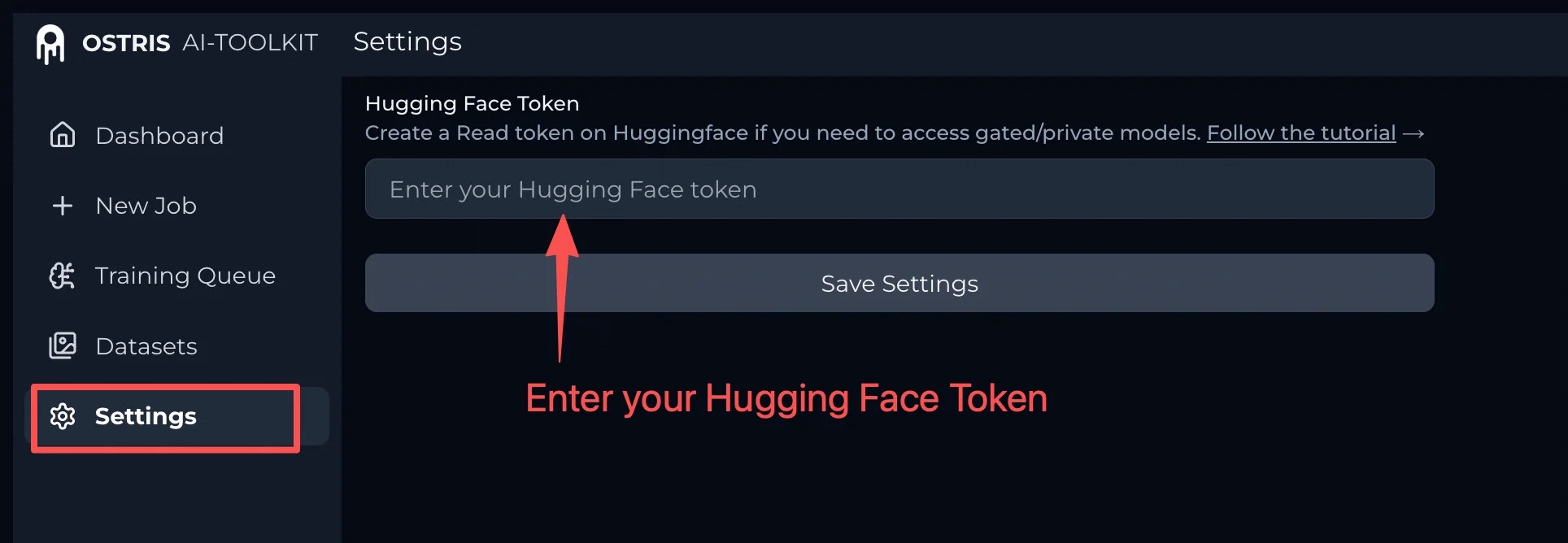
42257 FLUX_HF_TOKEN_REQUIRED
Meaning: FLUX model training requires a Hugging Face token. Where you may see it:POST /prod/v1/trainers/ai-toolkit/jobs
What to try:
- Provide a valid Hugging Face token (with read access) in the way your training config expects (for example via a config field or secret).
- Make sure the Hugging Face model repo is authorized for your account (many FLUX repos are gated: you must request/accept access on Hugging Face, and your token must be able to read that repo).
- Follow the step-by-step guide here: How to set up a Hugging Face token for FLUX training.
42258 FLUX2_OOM_RISK
Meaning: FLUX.2 training settings have a high out-of-memory (OOM) risk. Where you may see it:POST /prod/v1/trainers/ai-toolkit/jobs
What to try:
- Reduce
batch_sizeand/or reduce resolution (max_res). - As a rule of thumb, this error is raised when (batch_size \times (max_res/1024)^2 \ge 6).
42259 QWEN_EDIT_CONTROL_MISSING
Meaning: Qwen Edit requires control images in the dataset. Where you may see it:POST /prod/v1/trainers/ai-toolkit/jobs
What to try:
- In the config_file, add the required control images to your dataset (and re-upload), then wait for dataset
READYand retry job submission.
42260 QWEN_EDIT_SAMPLE_CONTROL_MISSING
Meaning: Qwen Edit requires control images in sample prompts. Where you may see it:POST /prod/v1/trainers/ai-toolkit/jobs
What to try:
- In the config_file, update your sample configuration so each sample prompt includes the required control image(s).

42261 WAN_I2V_SAMPLING_CRASH
Meaning: Missing Control Image in Samples. Your sample prompts are missing a Control Image. I2V sampling requires both a prompt and a control image for each sample. If a Control Image is missing, sampling may fail and training can stop early. Where you may see it:POST /prod/v1/trainers/ai-toolkit/jobs
What to try:
- Add a Control Image for every sample prompt in Samples in your config_file.
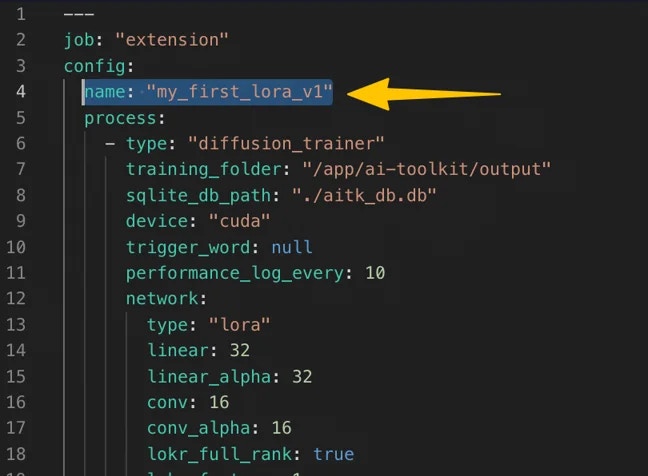
42262 INVALID_JOB_NAME
Meaning: Job name contains invalid characters. Where you may see it:POST /prod/v1/trainers/ai-toolkit/jobs
What to try:
- In the config_file, update the job name in your YAML (commonly
config.name) to avoid spaces and special characters.
42263 MULTI_FRAME_LATENT_CACHING
Meaning:num_frames > 1 together with cache_latents_to_disk is not supported.
Where you may see it: POST /prod/v1/trainers/ai-toolkit/jobs
What to try:
- If you need multi-frame training, disable latent caching to disk.
- If you need latent caching, set
num_frames: 1.
42264 DIFF_OUTPUT_PRESERVATION_TRIGGER
Meaning:diff_output_preservation is enabled but trigger_word is missing.
Where you may see it: POST /prod/v1/trainers/ai-toolkit/jobs
What to try:
- Set
trigger_wordwhen enablingdiff_output_preservation, then resubmit.
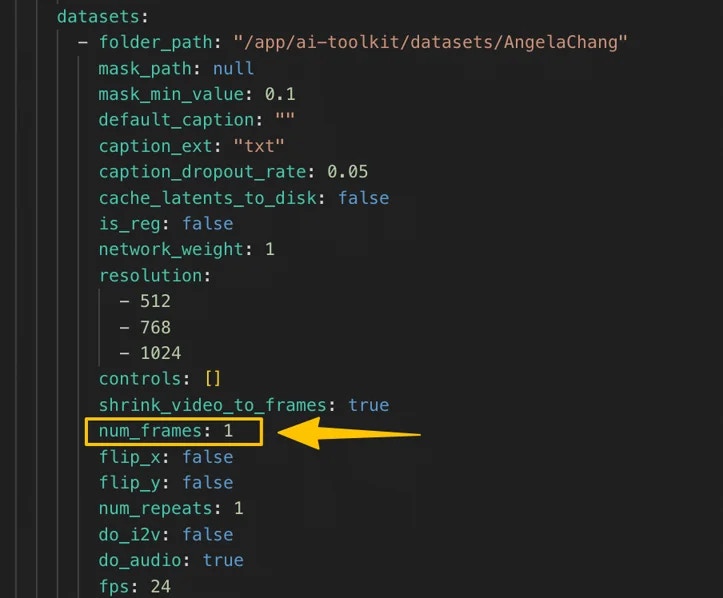
42265 VIDEO_LORA_NUM_FRAMES_ONE
Meaning: Your dataset contains video samples, but your training job’s config_file is configured withnum_frames = 1. With video data and num_frames = 1, AI Toolkit can’t correctly locate and load the training frames, so the job is very likely to fail.
Where you may see it: POST /prod/v1/trainers/ai-toolkit/jobs
What to try:
- Set Num Frames to a value greater than 1 (for example
41or81), then resubmit the job. - Double-check the dataset referenced by your config
folder_pathcontains video files (or video + caption.txtfiles) and that yournum_framesmatches the dataset type.
42266 IMAGE_DATASET_MULTI_FRAMES
Meaning: Image-only dataset is being used withnum_frames > 1.
Where you may see it: POST /prod/v1/trainers/ai-toolkit/jobs
What to try:
- If your dataset contains only images, set
num_frames: 1.
42267 INVALID_RESUME_STATE
Meaning: Job can only be resumed when it isSTOPPED (or CANCELED).
Where you may see it: POST /prod/v1/trainers/ai-toolkit/jobs/{job_id}/resume
What to try:
- Check the job status via
GET /prod/v1/trainers/ai-toolkit/jobs/{job_id}/status. - Only call
resumeafter the job transitions toSTOPPED(orCANCELED).
42268 LTX2_VIDEO_I2V_BATCH_SIZE
Meaning: LTX2 with video (num_frames > 1) or I2V (do_i2v = true) requires batch_size = 1.
Where you may see it: POST /prod/v1/trainers/ai-toolkit/jobs and POST /prod/v1/trainers/ai-toolkit/jobs/{job_id}/edit
What to try:
- Set
train.batch_sizeto1when training LTX2 with video data or I2V mode. - Current
batch_size > 1will cause a tensor shape mismatch at training start.
42269 DIFF_PRESERVATION_CACHE_CONFLICT
Meaning:diff_output_preservation and cache_text_embeddings cannot both be enabled at the same time.
Where you may see it: POST /prod/v1/trainers/ai-toolkit/jobs and POST /prod/v1/trainers/ai-toolkit/jobs/{job_id}/edit
What to try:
- Disable one of them before starting training: either turn off
diff_output_preservationor turn offcache_text_embeddings.
42270 IMAGE_MODEL_GC_OFF_OOM_RISK
Meaning: Large image model withgradient_checkpointing: false has very high out-of-memory (OOM) risk.
Where you may see it: POST /prod/v1/trainers/ai-toolkit/jobs and POST /prod/v1/trainers/ai-toolkit/jobs/{job_id}/edit
What to try:
- Turn ON Gradient Checkpointing (
train.gradient_checkpointing: true) in your config.
42271 FLUX_HIGH_BATCH_OOM_RISK
Meaning: FLUX.1-dev withbatch_size >= 8 has high OOM risk even with gradient checkpointing enabled.
Where you may see it: POST /prod/v1/trainers/ai-toolkit/jobs and POST /prod/v1/trainers/ai-toolkit/jobs/{job_id}/edit
What to try:
- Set
batch_sizeto 1–4 and increasegradient_accumulationto compensate.
42272 WAN_VIDEO_OOM_RISK
Meaning: Wan2.2 14B with 81+ frames at high resolution or batch_size risks OOM. Where you may see it:POST /prod/v1/trainers/ai-toolkit/jobs and POST /prod/v1/trainers/ai-toolkit/jobs/{job_id}/edit
What to try:
- Reduce
num_framesbelow 81, lower resolution, or setbatch_sizeto1.
42273 INVALID_GPU_COUNT
Meaning:gpu_count must be 1 or 8, and multi-GPU (8) is only supported for H100 (ADA_80_PLUS).
Where you may see it: POST /prod/v1/trainers/ai-toolkit/jobs and POST /prod/v1/trainers/ai-toolkit/jobs/{job_id}/edit
What to try:
- Use
gpu_count: 1(default, single GPU) orgpu_count: 8(multi-GPU, H100 only). - If you need multi-GPU training, set
gpu_typetoADA_80_PLUS(H100).
42274 INVALID_LEARNING_RATE
Meaning: Learning rate (train.lr) is missing, non-numeric, or not positive.
Where you may see it: POST /prod/v1/trainers/ai-toolkit/jobs and POST /prod/v1/trainers/ai-toolkit/jobs/{job_id}/edit
What to try:
- Set
train.lrto a valid positive number (e.g.1e-4).
42275 MISSING_MODEL_ARCH
Meaning:config.process[0].model.arch is required but missing.
Where you may see it: POST /prod/v1/trainers/ai-toolkit/jobs and POST /prod/v1/trainers/ai-toolkit/jobs/{job_id}/edit
What to try:
- Add the
model.archfield to your config. Supported values includeflux,wanfor Wan2.1/2.2,ltx2for LTX2,sdxlfor SDXL,zimage:turbofor Z-Image-Turbo, etc.
42276 INVALID_EDIT_STATE
Meaning: Job can only be edited when it is not active (STOPPED, CANCELED, or FAILED).
Where you may see it: POST /prod/v1/trainers/ai-toolkit/jobs/{job_id}/edit
What to try:
- Check the job status via
GET /prod/v1/trainers/ai-toolkit/jobs/{job_id}/status. - If the job is
IN_QUEUEorRUNNING, cancel it first withPOST .../cancel, then edit.
42277 CONFIG_NAME_IMMUTABLE
Meaning:config.name cannot be changed via edit; it must match the original job name.
Where you may see it: POST /prod/v1/trainers/ai-toolkit/jobs/{job_id}/edit
What to try:
- Keep the same
config.name(and/ormeta.name) as the original job when editing. - If you need a different name, submit a new job instead.
50051 JOB_INTERNAL_ERROR
Meaning: Unexpected internal error. What to try:- Retry after a short delay.
- If it repeats, contact support with the full error response and your
job_id.
50052 JOB_CREATE_FAILED
Meaning: Failed to create the job record in the database. Where you may see it:POST /prod/v1/trainers/ai-toolkit/jobs
What to try:
- Retry job submission once.
- If it repeats, contact support with the full error response and your request payload.
Getting help
If you hit an error not listed here, contact hi@runcomfy.com with the full error response plus yourdataset_id (and job_id if applicable).