
- an HTTP status code
- a numeric
error_code(when available) - a human-readable message
- optional details (for example a
"detail"array for validation errors)
General errors (HTTP layer)
401001 Unauthorized
API token missing/invalid/expired. Make sure you are sending:Authorization: Bearer <your-api-key>
You can regenerate your token from your Profile.
403003 Forbidden
The authenticated user does not own the deployment/request you are trying to access. Double check:- you’re using the correct
deployment_id - you’re using the token for the account that owns that deployment
404001 Not Found
The specified deployment, version, or request does not exist (deleted, never created, or wrong ID). Verify:- the
deployment_idin the URL - the
request_idyou are polling - that the resource still exists in your RunComfy account
422001 Validation Error
Request body failed schema validation. Common causes:overridesis missing or malformed- node IDs don’t exist in the deployment’s
workflow_api.json - input keys don’t exist under the target node’s
inputs - wrong value types (enums, ranges, malformed URLs/Base64)
- inspect the
"detail"array in the response (it usually points to the exact field) - compare your payload to the deployment’s saved workflow schema
- keep overrides minimal and add fields incrementally
500001 Internal Error
Unexpected server-side error. Retry with exponential backoff.Deployment gating errors
These errors occur before the request is accepted.10001 InsufficientFunds
The deployment is disabled because your balance/plan does not allow new runs. To resolve:- Add funds or upgrade your plan on RunComfy Pricing
- Re-enable the deployment in the UI (Edit Deployment)
10002 DisabledDeployment
The deployment is disabled. Re-enable it on the Deployment Edit page.10003 DeletedDeployment
Thedeployment_id no longer exists (it was deleted). Create/select a new deployment and update your client code.
ComfyUI prompt queuing errors
These happen when the gateway tries to queue the prompt on the ComfyUI backend.10013 EmptyWorkflowApiJson
The deployment is missing a savedworkflow_api.json.
Fix:
- open the workflow in ComfyUI Cloud
- confirm it runs
- click Cloud Save to generate a new version
- update the deployment to use that version
10007 ComfyUIConnectionError
The gateway couldn’t reach a healthy ComfyUI backend. Typical causes:- cold start still initializing
- backend crash / container restart
- timeout / origin down / DNS routing issues
10009 FileUploadException
The server could not retrieve the media you referenced. For image/video inputs underoverrides."<NODE_ID>".inputs.<PARAM>, the value must be:
- a direct, publicly accessible HTTPS URL that returns the file (no login pages, no cookies), or
- a valid Base64 data URI (
data:<mime>;base64,...)
10008 ComfyUIQueuePromptError
Youroverrides do not match the deployment’s stored workflow_api.json.
Guidelines:
- treat
workflow_api.jsonas the source of truth - use exact node IDs and input names
- don’t replace a connected input (latent/model/etc.) with a literal value unless the workflow expects it
- validate values against the node schema (
object_info.json)
10004 QueuePromptUnexpectedError
Unexpected internal error while queuing the prompt. Retry with backoff and keep overrides minimal.Status polling errors
These happen while polling.../status.
10007 ComfyUIConnectionError
Same as above — backend unreachable or unhealthy.10012 ComfyUIRequestMissing
The backend crashed or ran out of memory before it could accept your request, so the gateway has no in-flight record to track. Common signs include OOM kills and container restarts around the request time.10005 PollingResultUnexpectedError
Unexpected error while polling status. To debug:- run the same workflow and inputs in ComfyUI Cloud
- confirm the workflow completes end-to-end
- retry the API request
Result retrieval errors
These happen while fetching.../result.
10007 ComfyUIConnectionError
Same as above — backend unreachable or unhealthy.10012 ComfyUIRequestMissing
Same as above — request disappeared due to crash/restart.10011 ComfyUIExecutionError
A node threw an exception at runtime. Common causes:- GPU out-of-memory (too large resolution/batch/steps)
- unreadable/corrupt media
- malformed URLs or partial downloads
- type/shape mismatch between nodes
- reduce resolution/batch/steps
- reduce concurrency
- switch to a larger GPU tier
10006 ResultRetrievalUnexpectedError
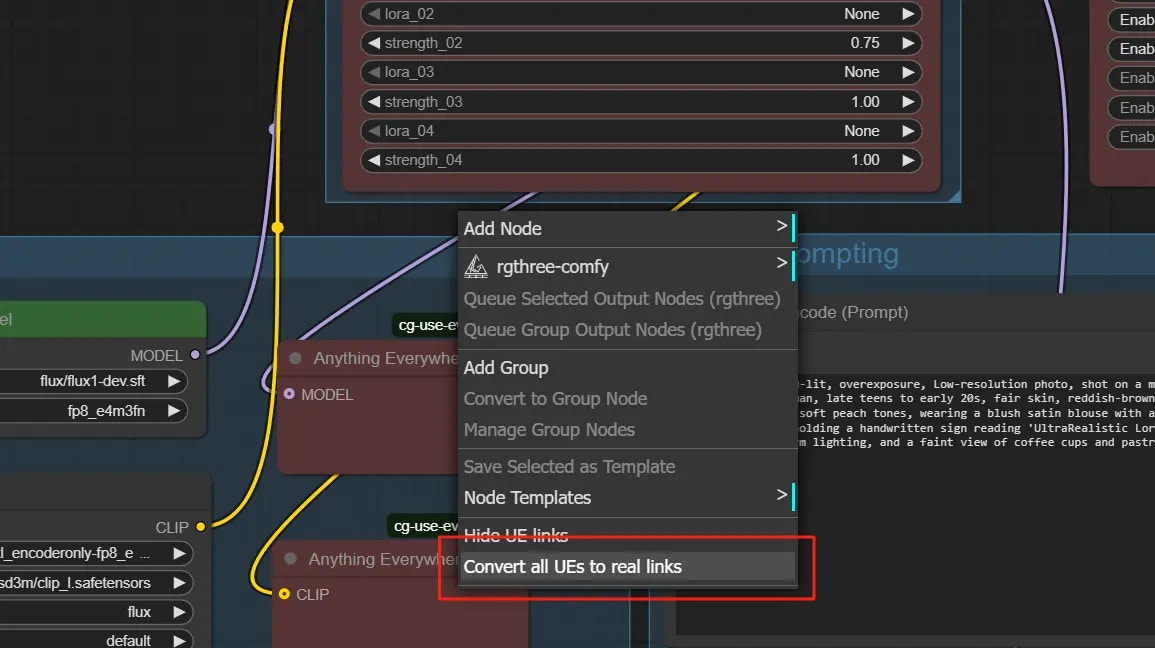
The run appears finished, but outputs could not be returned. Common causes:- outputs weren’t materialized due to
cg_use_everywherevirtual links - no outputs were written because inputs were identical to a previous run (ComfyUI caching)
- workflow configuration/path prevented outputs from being written
- In ComfyUI: right-click the canvas →
Convert all UEs to real links, then re-run - Change the seed or modify any input to force a new output
- Re-run the same workflow in ComfyUI Cloud to verify outputs are produced
200001 ExecutionWithoutNewYield
No new outputs were written because the run was identical to a previous one. Change the seed or any input (prompt/image/video/etc.) and retry.General server error
10000 InternalServerError
Unexpected internal error not matching another category. Retry after a short delay. If the issue persists, collect the full error response and contact support.Getting help
If you encounter an error code not listed here, or if the suggestions do not resolve your issue:- Review the relevant API reference page to confirm required fields and request format
- Email support at hi@runcomfy.com with the full error response, your
deployment_id, yourrequest_id(if applicable), and the approximate time of the issue